










Legacy systems are expensive to maintain, hinder growth, and pose security risks. By 2026, 62% of U.S. firms still rely on outdated software, costing $370 million annually in technical debt. Modernizing these systems can save money, improve performance, and reduce risks – but only if done carefully. Here’s how you can upgrade without disrupting operations:
- Start with an assessment: Inventory all components, map dependencies, and analyze the business impact of technical debt.
- Set clear goals: Define measurable objectives like cost savings, faster processing, or improved security.
- Use the 7 R’s framework: Options range from retaining or retiring systems to rehosting, refactoring, or rebuilding them.
- Adopt incremental updates: Break the process into phases, run parallel systems, and test thoroughly to minimize risks.
- Focus on stability: Automate testing, implement zero-trust security, and monitor performance to ensure smooth transitions.
- Leverage cloud technologies: Use microservices, managed databases, and scalable infrastructure for long-term flexibility.
- Bring in experts: External IT professionals can fill skill gaps and ensure modernization projects succeed.
Modernization isn’t about replacing everything at once. It’s about balancing cost, risk, and value – upgrading what’s necessary while keeping critical operations intact.
Legacy Application Modernization: Best Practices & Risks of Inaction
sbb-itb-05efa2a
Assess Your Current System and Set Clear Goals
Before diving into code updates, take a step back and evaluate your system thoroughly. It’s a crucial step that many skip, leading to trouble later. Here’s a striking fact: 87% of IT decision-makers believe modernizing legacy systems is key to organizational success, yet 74% of companies fail to complete these projects. Why? They skip the critical assessment phase. This evaluation forms the backbone of choosing the right modernization strategy.
Conduct a Complete Inventory of Legacy Components
Start by creating a detailed inventory of every application, database, and integration point in your system. Don’t just focus on the obvious tools – dig deeper to uncover "shadow IT." These are the Microsoft Access databases or Excel spreadsheets employees have quietly turned into essential tools. Without identifying these hidden components, you risk leaving gaps in your modernization effort.
Mapping out system dependencies is equally important. Changes in one area can ripple through the system, affecting stability elsewhere. Using AI-powered discovery tools can help here, revealing code duplication and vulnerabilities that manual checks might miss. A great example: Goldman Sachs adopted auto-coding AI tools in June 2024, boosting developer proficiency by 20% and simplifying their internal software upgrades. Be sure to involve key stakeholders during this audit to get a well-rounded view of the system’s strengths, weaknesses, and pain points.
Perform a Business Impact Analysis
Take a hard look at the impact of your system’s technical debt. Does it take weeks to make minor updates? Are costs spiraling out of control? If so, your system isn’t delivering the value it should. Watch for red flags like frequent crashes, struggles with modern API integration, lack of vendor support, or difficulty finding developers with the necessary skills.
Numbers paint a clear picture. For instance, modernized systems can increase processing speeds by up to 80%, cutting response times from 5 seconds to under 1 second. By quantifying operational inefficiencies and financial drains, you’ll have a solid case for modernization.
Define Your Modernization Goals
Clear, measurable goals are the cornerstone of a successful modernization project. Use frameworks like GQM (Goals, Questions, Metrics) to set objectives, identify key questions, and establish metrics to track progress. For example, if your goal is cost savings, aim for infrastructure savings of 15-35% year-over-year. If security is your focus, measure how quickly threats are identified, targeting a 90%+ improvement.
"When you can show how your modernization program is directly providing value to the organization, it’s harder for people to question its lifespan." – Shodhan Sheth, Global Head of Enterprise Modernization, Thoughtworks
It’s also important to separate operational goals, like reducing technical debt, from product goals, such as adding new customer features. Trying to tackle everything at once can overwhelm your team. Document your current performance metrics – like the number of transactions supported per customer – so you can measure improvements later. Companies that adopt application modernization often see a 74% reduction in hardware, software, and staffing costs, but only when they start with clear, measurable objectives. These goals will guide your roadmap and ensure you’re making meaningful progress.
Choose the Right Modernization Approach: The 7 R’s Framework
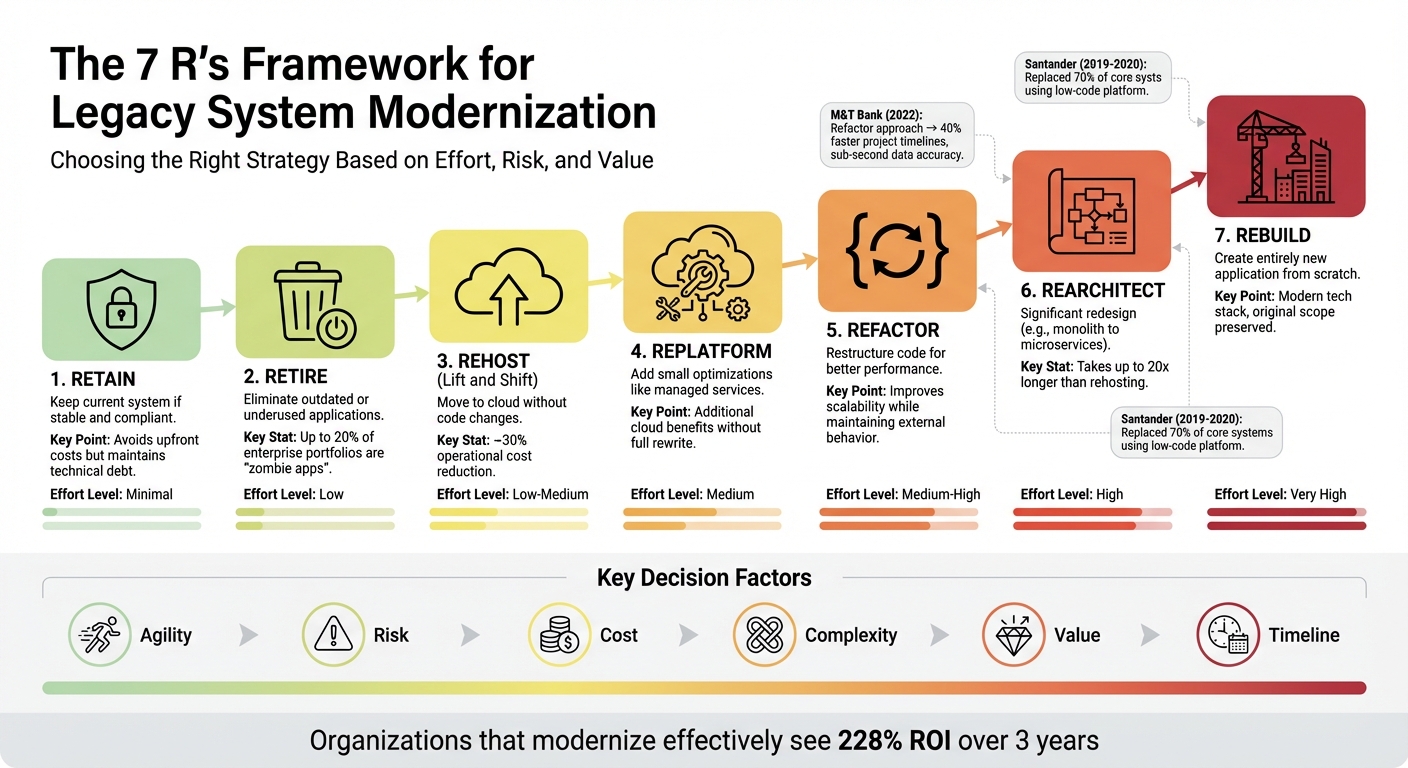
7 R’s Framework for Legacy System Modernization Strategy
After assessing your system and setting clear goals, the next step is selecting a modernization strategy. The 7 R’s framework offers a structured way to weigh your options, balancing cost, risk, and potential rewards. Choosing wisely can be the difference between success and failure. Consider this: about 70% of Fortune 500 companies still rely on software developed over two decades ago, and 75% of cloud migrations fall short of expectations due to poor planning. The 7 R’s can help you avoid these pitfalls.
Overview of the 7 R’s
Each of the 7 R’s represents a different level of effort and transformation, from minimal tweaks to complete rebuilds:
- Retain: Stick with the current system if it’s stable and meets compliance needs. This avoids upfront costs but keeps technical debt intact.
- Retire: Eliminate outdated or underused applications – often referred to as "zombie" apps. Research shows that up to 20% of enterprise portfolios fall into this category.
- Rehost: Often called "lift and shift", this involves moving applications to the cloud without altering the code. It’s a quick option, typically reducing operational costs by about 30%.
- Replatform: Builds on rehosting by introducing small optimizations, like switching to managed services such as Amazon RDS. This approach captures additional cloud benefits without a full rewrite.
- Refactor: Focuses on restructuring the code to improve performance or scalability, while keeping the application’s external behavior the same.
- Rearchitect: Entails significant redesigns, like breaking a monolithic app into microservices, to fully leverage cloud-native features. However, this can take up to 20 times longer than rehosting.
- Rebuild: Involves creating an entirely new application from scratch using modern technologies, while preserving the original scope.
Real-world examples highlight the impact of these strategies. In 2022, M&T Bank adopted a refactor approach, moving from batch processing to a real-time event-driven architecture using the Z Digital Integration Hub. This change reduced data staleness from 3 hours to sub-second accuracy and cut project timelines by 40%. Meanwhile, in 2024, Denso opted for a rebuild strategy to develop generative AI-powered control technology for autonomous robotics. This innovation improved robotic flexibility and opened new markets in automation and agriculture. These cases show how the right strategy can deliver measurable business results.
Select the Best Approach for Your System
Using the 7 R’s as a guide, narrow your choices by considering factors like agility, risk, cost, complexity, and potential value. Evaluate your applications against these six criteria. For a fast migration or to exit a data center with minimal disruption, rehost might be the most practical route. If you’re dealing with low-usage applications, retiring them can reduce maintenance costs and eliminate security risks.
When you want the benefits of managed services without major architectural changes, replatform strikes a good balance between speed and added cloud advantages. On the other hand, if your business requires greater scalability or features that current systems can’t support, refactor or rearchitect could be the answer. While these options are more complex and costly, they offer the greatest long-term flexibility.
"The best modernization opportunities are those with multiple drivers from both a business and IT perspective."
- Stefan Van Der Zijden, Analyst, Gartner
To prioritize which systems to modernize first, plot your applications on a matrix measuring "ease/difficulty" against "potential increased value". Organizations that modernize effectively can see a 228% ROI over three years. For example, between 2019 and 2020, Santander replaced 70% of its core systems using the OutSystems low-code platform. This transformation enhanced the user experience while maintaining critical operations, all without destabilizing core banking functions. This incremental approach demonstrates how tailoring your modernization path to each system can yield impactful results while preserving what already works.
Develop a Phased Modernization Roadmap
Once you’ve chosen your strategy, it’s time to break the work into smaller, manageable steps. Tackling the modernization in phases minimizes risks and keeps your operations steady while you update the system. Instead of attempting a complete overhaul, incremental updates allow you to spread out resources and deliver results in as little as 12 weeks. This phased method also helps you identify and prioritize the system’s key components.
Map Dependencies and Prioritize Components
Start by mapping out how different components of your system are connected. Tools like static analysis can help you examine source code, configuration files, and scripts to uncover how programs, data structures, and processes interact. Visual dependency graphs can make these relationships clearer. Pay attention to "seams" – the points where code or modules interact. These could be external (like APIs or file transfers) or internal (such as database interactions or batch processing handoffs).
When prioritizing what to tackle first, focus on three main factors:
- Business impact: How does the component affect revenue or customer satisfaction?
- Technical risk: Is it prone to failures or security vulnerabilities?
- Operational challenges: Does it create scalability issues or require complex maintenance?
For quick wins, identify smaller upgrades that can deliver value with minimal risk. Also, look for "stable zones" – areas of the system with low interaction and infrequent updates. These are often safer starting points.
Here’s a real-world example: A UK consumer data platform discovered that one subsystem accounted for 80% of their total MIPS usage. This insight helped them focus their modernization efforts.
"Legacy systems are rarely monolithic in practice; they are interconnected collections of services, job flows, and data pipelines. Static analysis exposes those interdependencies, allowing teams to isolate stable components and refactor them safely."
Implement Parallel Environments
Once dependencies are mapped, ensure a smooth transition by running old and new systems simultaneously. A reverse proxy or API gateway can act as a traffic controller, initially routing all requests to the legacy system. As new modules are completed, the proxy gradually redirects specific endpoints to the updated components.
To test the new system without disrupting users, use shadow traffic (or dark launching). This method duplicates production requests to both systems and compares their outputs. Any mismatches can be caught early, ensuring the new system meets expectations.
One example of this approach comes from the Jochen Schweizer mydays Group. After a merger, they operated legacy and new systems side by side, achieving 100% availability with zero downtime. They also reduced page load times by 37% during the migration. Similarly, a large grocery retailer modernized its coupon system by extracting just the /get_coupons functionality into a new RESTful service, while keeping other requests on the legacy system.
To keep data consistent across both systems, use techniques like Change Data Capture (CDC) or dual-write strategies. Before shifting traffic, set up logging, metrics, and tracing to establish a performance baseline. Feature flags can also help by gradually exposing new components to a small user group and allowing quick rollbacks if needed.
"While this [transitional architecture] may appear to be a waste, the reduced risk and earlier value from the gradual approach outweigh its costs."
- Martin Fowler, Software Architect
Establish Timelines and Budgets
With clear goals in mind, set achievable timelines and budgets. A phased approach allows for iterative funding, so you don’t need to secure all resources upfront. Delivering smaller, minimal upgrades early on can demonstrate value and build momentum for further investment. Start with a Discovery and Risk Mapping phase to document critical workflows and pinpoint problem areas before finalizing your plan.
Use a split-and-seed model to organize your team. Initial team members can form new product teams as Minimum Viable Products (MVPs) are defined. Plan to manage both old and new systems during the transition. Invest in CI/CD pipelines and automated testing early to reduce deployment failures – some teams have seen a 42% drop in failures within six months.
Track progress with technical KPIs, such as the percentage of traffic redirected from the legacy system or reductions in deployment downtime. Focus on a "Time to Stability" metric, which can often be achieved within four weeks, to ensure operational continuity takes priority over just completing features.
"The allocation of people and resources can occur in phases thanks to the incrementally built nature of the new system, which can be more manageable than allocating them for a complete overhaul."
- Premanand Chandrasekaran, Thoughtworks
Ensure Stability with Automated Testing and Security Enhancements
As you move forward with your phased roadmap, maintaining system stability is critical. This involves integrating continuous testing and adopting modern security practices. These steps are essential to prevent disruptions and protect your systems during the transition from legacy frameworks to modern ones. Without automated testing, you risk deploying unstable code, and without updated security measures, you leave your system vulnerable to attacks at a critical time.
Use Automated Testing to Prevent Disruption
From the very beginning, incorporate continuous testing into your process. Start with characterization tests to document how legacy systems currently behave. These tests act as a safety net, flagging any unintended changes that might occur during integration.
Contract testing is another key practice, ensuring APIs and interfaces maintain consistent inputs and outputs. This helps preserve the reliability of external system dependencies. Following the test pyramid approach – focusing on unit and integration tests over slower, less reliable UI tests – can further streamline your efforts.
Consider this example: A major logistics company running a monolithic ERP system faced an average of four critical deployment rollbacks annually. After adopting a Continuous Integration (CI) approach with automated build verification, they eliminated critical rollbacks entirely within nine months.
"Testing is the foundation: Automated testing, particularly characterization and contract tests, is the single most important step to de-risk the legacy code base. Without it, CI/CD is just faster failure."
- Pratik, Technology Evangelist, Cyber Infrastructure (CIS)
To further ensure reliability, use shadow mode to compare the outputs of legacy and modernized components in real time before full deployment. You might also start with canary releases, where new functionality is rolled out to just 1–5% of users, allowing you to validate stability while minimizing risk.
While automated testing secures functionality, modernizing your security measures is equally important for a seamless transition.
Integrate Zero-Trust Security Models
Once testing ensures operational consistency, focus on strengthening your defenses with a zero-trust security strategy. Legacy systems often operate on outdated assumptions, such as trusting everything within a network perimeter. A zero-trust approach flips this model by requiring explicit verification for every transaction, enforcing least privilege access, and assuming that breaches are always a possibility.
"Zero Trust is not a product or tool, but an essential security strategy that seeks to continuously verify every transaction, asserts least privilege access, and assumes that every transaction could be a possible attack."
- Microsoft
One way to implement this is by using a strangler proxy. This intercepts requests and applies modern security policies before traffic reaches legacy systems. Additionally, an anti-corruption layer can help bridge outdated data models with secure, modern objects during service extraction.
Regularly conduct tabletop exercises to simulate potential security incidents, such as authentication failures or data breaches. These drills can expose vulnerabilities before attackers do. Building a detailed inventory of all identities, devices, applications, and infrastructure will help you better understand your attack surface. This not only increases the cost of an attack but also reduces the potential return for attackers.
The NIST National Cybersecurity Center of Excellence collaborated with 24 organizations to create 19 examples of Zero Trust Architecture, proving its effectiveness across various scenarios. Additionally, companies using the Strangler Fig Pattern alongside proper testing have reported 40% lower project failure rates compared to high-risk "Big Bang" rewrites.
Use Cloud Enablement and Continuous Monitoring
Once your system is stable with automated testing and zero-trust security, the next step is to take advantage of modern infrastructure. Cloud technologies and real-time monitoring can make your system not just operational but also scalable and resilient. By adopting cloud enablement, you gain the flexibility to grow, while continuous monitoring ensures potential issues are addressed before they impact users.
Adopt Cloud-Native Technologies
Cloud-native technologies offer the ability to scale dynamically and respond swiftly to demand. Unlike traditional setups, cloud-native applications can handle anything from a handful of users to millions, all while processing large data volumes in milliseconds. This elasticity also helps shift costs from high upfront capital expenses (CapEx) to a more manageable operational expense (OpEx) model.
Breaking down monolithic systems into microservices is another key advantage. This approach allows you to scale specific parts of your application independently. For example, during peak times, you can scale just the checkout process without affecting other functionalities. Tools like the Strangler Fig Pattern facilitate a smooth transition by enabling legacy and modern systems to coexist. This pattern uses an API Gateway to route traffic intelligently, ensuring business operations remain uninterrupted.
Case studies show that combining AI with cloud-native tools can significantly speed up system upgrades, leading to improved efficiency and reduced costs.
"Modernization is not just about applications; it requires a modern infrastructure that provides a secure and flexible operations framework."
- Vijay Thumma and Ashish Ameta, Amazon Web Services (AWS)
To get started, focus on applications that are low in complexity and dependencies but deliver high business value. This approach allows you to demonstrate quick results. As you progress, create a Center of Excellence to gather feedback, promote continuous improvement, and support teams during the transition. Use managed databases to decouple data from the monolith for better reliability, and integrate security early in the development process to boost success rates.
Establish KPIs for Post-Rollout Optimization
After launching your modernized system, monitoring should shift from basic server uptime to customer journey performance and service-level metrics. The goal is to understand how the system performs from the user’s perspective, not just the infrastructure’s.
Key operational metrics include deployment frequency, lead time, and mean time to recover (MTTR). MTTR is particularly important as it measures how quickly users recover from an issue, offering a clear picture of operational maturity. Other metrics to track include uptime, response times (like P99 latency), error rates, and throughput. For infrastructure, monitor CPU, memory, disk IOPS, and network saturation at the container level.
| Metric Category | Key Performance Indicators (KPIs) |
|---|---|
| Operational Metrics | Lead time, cycle time, deployment frequency, time to restore service, change failure rate |
| Product Metrics | Impact of new features on business operations, customer value delivery |
| Infrastructure Metrics | Latency, throughput, data residency compliance, cloud spend/cost per transaction |
Set Service Level Objectives (SLOs) early on, translating business goals into specific targets for latency and availability before the system goes live. Move beyond basic alerts (like CPU > 85%) to more meaningful notifications, such as "error budget burn", which directly impacts SLOs. Tag telemetry data by environment, region, service, team, and version to streamline troubleshooting. Additionally, automate on-call routing with embedded runbooks to reduce MTTR.
"Migration isn’t complete without observability, and observability isn’t a bolt-on; it’s the operating system of your new stack."
Organizations that embrace modern software engineering principles are 2.5 times more likely to meet their business objectives. With 86% of companies running production workloads on public cloud infrastructure and 68% using containers for production applications, robust monitoring is no longer optional – it’s the backbone of sustained success.
Partner with Experts for IT Staffing and Support
After securing stability through testing, security measures, and cloud integration, having the right IT staffing in place is the next step to ensure smooth modernization.
Modernizing legacy systems comes with a unique challenge: finding the right talent. A staggering 74% of employers report struggling to fill IT roles. This skills gap often leaves organizations without the expertise needed for cloud-native architectures, microservices, or DevSecOps. External IT professionals can fill this void, offering immediate access to specialized skills that internal teams, often burdened with day-to-day operations, may not have the bandwidth to develop.
The Role of Expert IT Professionals in Modernization
Bringing in external experts allows for an unbiased evaluation of your legacy systems. Decisions made years ago were based on outdated constraints, and external professionals can assess your architecture and technical debt without the emotional ties that internal teams might have. They use structured frameworks to identify and prioritize issues, which is critical given that roughly 40% of enterprise IT budgets are spent on maintenance alone.
These experts also rely on proven techniques, such as enabling legacy and modern systems to operate simultaneously. This approach ensures continuity and allows for seamless rollbacks if needed. A clear example of what can go wrong without such expertise is the July 2022 Rogers Communications outage, caused by a misconfiguration after a risk downgrade. Experienced partners help you avoid such disasters.
"Modernization is not dangerous when technology is outdated. It becomes dangerous when risk is underestimated."
Beyond technical execution, these professionals integrate quality assurance and automated testing into the modernization process to avoid creating new issues, often referred to as "modernization debt". They also focus on knowledge sharing, providing documentation and training to equip internal teams with the skills needed to manage the updated systems long after the project is complete. This comprehensive approach ensures that modernization efforts are both effective and sustainable.
Equifier‘s IT Staffing and Consulting Solutions
Equifier connects businesses with top-tier IT professionals and cybersecurity consultants to address these challenges. They specialize in sourcing talent for both full-time and contract roles, leveraging a national network of candidates. Whether you need temporary staff to handle capacity issues or strategic engineering partners for complex projects, Equifier ensures you have access to the right expertise.
Their cybersecurity consulting services are particularly valuable, embedding Zero Trust models and modern identity management into your modernization strategy. This transforms security from a reactive hurdle into a proactive enabler. Equifier also offers IT consulting services that optimize infrastructure and cloud solutions. Their comprehensive application assessments inventory existing systems and prioritize modernization efforts based on business value and ease of transition.
With the global average cost of a data breach projected to reach $4.44 million by 2025, and only 30% of organizations having fully modernized their environments, partnering with experts like Equifier is essential. They help manage risk, accelerate time-to-market, and strengthen your modernization roadmap – filling talent gaps while ensuring operational efficiency and reducing potential risks.
Conclusion
Updating a legacy system doesn’t have to feel like rolling the dice. Instead, think of it as a series of thoughtful decisions rather than one massive overhaul. Begin with a detailed audit to map out dependencies and pinpoint the components most critical to your business. From there, use the 7 R’s framework to decide the best course of action for each part of your system – whether it’s rehosting, refactoring, or gradually replacing elements through the Strangler Fig pattern. This step-by-step strategy ensures a smoother progression through each phase.
Taking it slow and steady matters. The numbers don’t lie: 83% of data migration projects either fail or go over time and budget when rushed. To avoid these pitfalls, consider running parallel environments, automating your testing processes, and setting up clear rollback plans. A well-structured CI/CD pipeline also helps minimize deployment risks and keeps your system running without major disruptions.
While modernization offers cost savings and better performance, achieving these outcomes requires the right expertise. With a significant portion of IT budgets tied up in maintaining outdated systems, bringing in experienced professionals is not just helpful – it’s essential. This reinforces the importance of careful planning and skilled guidance throughout the process.
"Success can be seen as the muscle memory of the organization itself developing, to expect a regular cadence of change."
- Ashok Subramanian, Head of Technology, Europe, Thoughtworks
Modernization isn’t a one-time project – it’s an ongoing journey that strengthens your organization’s ability to adapt and grow. By combining strategic planning, incremental implementation, thorough testing, and expert input, you can turn potential challenges into a long-term competitive edge.
FAQs
How do I pick the right ‘R’ for each legacy app?
When deciding on the right approach – rehost, refactor, rearchitect, rebuild, replace, or retire – it’s all about understanding your goals and the app’s specific situation. If speed is your priority, rehosting might be the way to go for a quick cloud migration. On the other hand, if your focus is on improving scalability or performance, refactoring could be the better choice.
For those looking to modernize gradually while keeping risks low, the Strangler Fig pattern is a smart strategy. It allows for incremental updates rather than a complete overhaul all at once. As you weigh your options, think about factors like the app’s complexity, its importance to your operations, and the level of technical debt involved. These considerations will help you choose a path that aligns with your goals while keeping disruptions to a minimum.
What’s the safest first step to modernize with zero downtime?
The Strangler Pattern is the safest way to start modernizing a legacy system without causing downtime. With this method, parts of the old system are replaced step by step, while the original system continues to run as usual. This gradual approach minimizes disruption and allows new components to integrate smoothly, reducing risks throughout the process.
How do I know modernization is working after rollout?
To gauge the success of modernization efforts, keep an eye on key performance indicators (KPIs) such as system performance, error rates, response times, and user experience. Using continuous monitoring tools can help you spot potential problems early and ensure the system stays aligned with your business objectives. Success becomes clear when the system operates more efficiently, experiences less downtime, and provides stronger support for day-to-day operations – proving that the modernization initiative is delivering real results.