









Your build pipeline moves code from development to production quickly, but it can also expose vulnerabilities. Security scans are essential to catch risks like hardcoded secrets, insecure libraries, and misconfigurations before they reach production. Here’s why they matter:
- Open-source risks: Up to 90% of modern applications rely on open-source code. Over 40,000 new vulnerabilities (CVEs) were reported last year.
- Shift-left strategy: Scanning early in development reduces costs and prevents emergency fixes.
- Pipeline threats: Attacks like Poisoned Pipeline Execution (PPE) can compromise entire systems, as seen in the SolarWinds breach.
- Compliance: Automated checks help meet standards like OWASP Top 10 and PCI DSS.
Security scans, such as SAST, SCA, and container/IaC scanning, protect your code, dependencies, and deployment environments. They block insecure code, provide instant developer feedback, and ensure compliance – keeping your pipeline secure without slowing down delivery.
Security Risks in Build Pipelines
How Rapid Development Cycles Create Vulnerabilities
The fast pace of modern CI/CD pipelines speeds up software delivery but often comes at a cost: overlooked security measures. Developers may unintentionally expose sensitive information like API keys, passwords, or tokens in source control or build logs. Without automated security checkpoints in place, malicious code can slip through undetected. As the OWASP Foundation aptly describes:
"CI/CD environments, processes, and systems are the beating heart of any modern software organization".
This central role makes pipelines a prime target for attackers. One notable method, Poisoned Pipeline Execution (PPE), involves injecting malicious code directly into the pipeline. The SolarWinds breach, which impacted around 18,000 customers, is a stark example of how devastating such vulnerabilities can be. These risks aren’t limited to the code you write – they extend to the external libraries and components your projects depend on.
Risks from Dependencies and Open-Source Libraries
Third-party and open-source libraries bring convenience but also introduce hidden dangers. Vulnerabilities can lurk deep within dependency trees, making them hard to spot. Even worse, dependency confusion attacks can trick systems into downloading malicious packages from public registries instead of trusted private sources. Real-world cases like the compromised NPM packages ua-parser-js, coa, and rc – each downloaded millions of times weekly – highlight the scale of the risk. When these packages were tampered with, they executed malicious code across countless build environments. Using outdated components only adds to the problem by exposing known weaknesses. As Qualys points out:
"Risk now enters through open-source dependencies, container base images, infrastructure as code templates, orchestration manifests, serverless packages, and even cloud service configurations".
Catching these vulnerabilities early in the development cycle is essential for secure software practices.
Meeting Compliance and Regulatory Requirements
Delaying security checks until late in the process can lead to compliance issues, emergency rollbacks, or even compromised software. With the average data breach costing $4.88 million and cyberattacks on the rise, incorporating automated compliance checks is no longer optional. This includes checks for tools like Terraform, CloudFormation, and accounts with broad CI/CD access. Senior Cybersecurity Engineer Reuben Ong underscores this point:
"Security is no longer optional – it’s a fundamental requirement for modern software development".
Recognizing these risks is the first step toward building a more secure development pipeline.
Setting Up A Security Scanning Pipeline From Start To Finish DevSecOps
How Security Scans Protect Your Build Pipeline
Security scans bring protection into the heart of your development process, making it a proactive defense rather than an afterthought. By automating checks throughout the pipeline, you can catch vulnerabilities before deployment, saving time, money, and headaches. This practice, often called "shift-left" security, embeds testing into the earliest stages – like the IDE, pre-commit hooks, and pull requests – where developers spend most of their time. The result? Faster detection and resolution of security flaws.
Finding Vulnerabilities Early
Automated scans run during every code update, analyzing your work from multiple angles. Tools like SAST identify insecure coding patterns, while SCA highlights issues in third-party libraries, which make up 70% to 90% of modern software. Secret detection tools catch hard-coded API keys and passwords before they can enter your repository. With the sheer volume of threats, manual reviews just aren’t practical. As SonarSource puts it:
"Fixing a bug in the IDE takes minutes. Fixing it after deployment can take much longer."
This saves time and lowers risk. Quality gates can even halt a build if critical vulnerabilities are found, ensuring that insecure code never makes it to production. For teams using AI-generated code, this step is especially important. AI tools often focus on functionality over security, making automated scans essential to catch vulnerabilities at scale.
Reducing the Attack Surface
Security scanning builds a layered defense, targeting various parts of your pipeline. While SAST focuses on your code logic, IaC (Infrastructure as Code) scanning checks Terraform and Kubernetes configurations for issues like open ports or overly permissive IAM roles before infrastructure is deployed. Meanwhile, container scanning inspects OS packages and binaries within image layers for vulnerabilities. This multi-faceted approach addresses risks across code, infrastructure, and container setups, cutting down potential entry points for attackers.
To avoid getting bogged down by legacy code, teams can focus quality gates on new or recently modified code, maintaining high standards without overwhelming developers. IDE plugins provide instant feedback – like a spell-checker – so developers can fix issues as they write, instead of hours or days later. This real-time loop significantly reduces the time vulnerabilities remain exposed.
Automated Compliance and Reporting
Beyond catching bugs, automated scans also streamline compliance. They generate the documentation needed to meet regulatory standards like OWASP Top 10, CWE, and PCI DSS. SCA tools automatically create a Software Bill of Materials (SBOM), offering a clear inventory of components for audits and quick responses to emerging vulnerabilities. As SonarSource explains:
"Automated analysis generates the necessary paper trail and reporting (such as for OWASP Top 10, CWE, and PCI DSS) required to attest to regulatory compliance and prove to leaders that code is meeting security and quality standards."
Policy checks built into the CI/CD pipeline ensure every release meets compliance requirements consistently, without manual intervention. Time-stamped reports in formats like PDF or JSON satisfy auditors and can serve as evidence for future investigations. License compliance scanning also helps avoid legal risks by comparing third-party dependencies against company policies. This automation turns compliance into a seamless, developer-friendly process that’s baked into your workflow.
Types of Security Scans for Build Pipelines
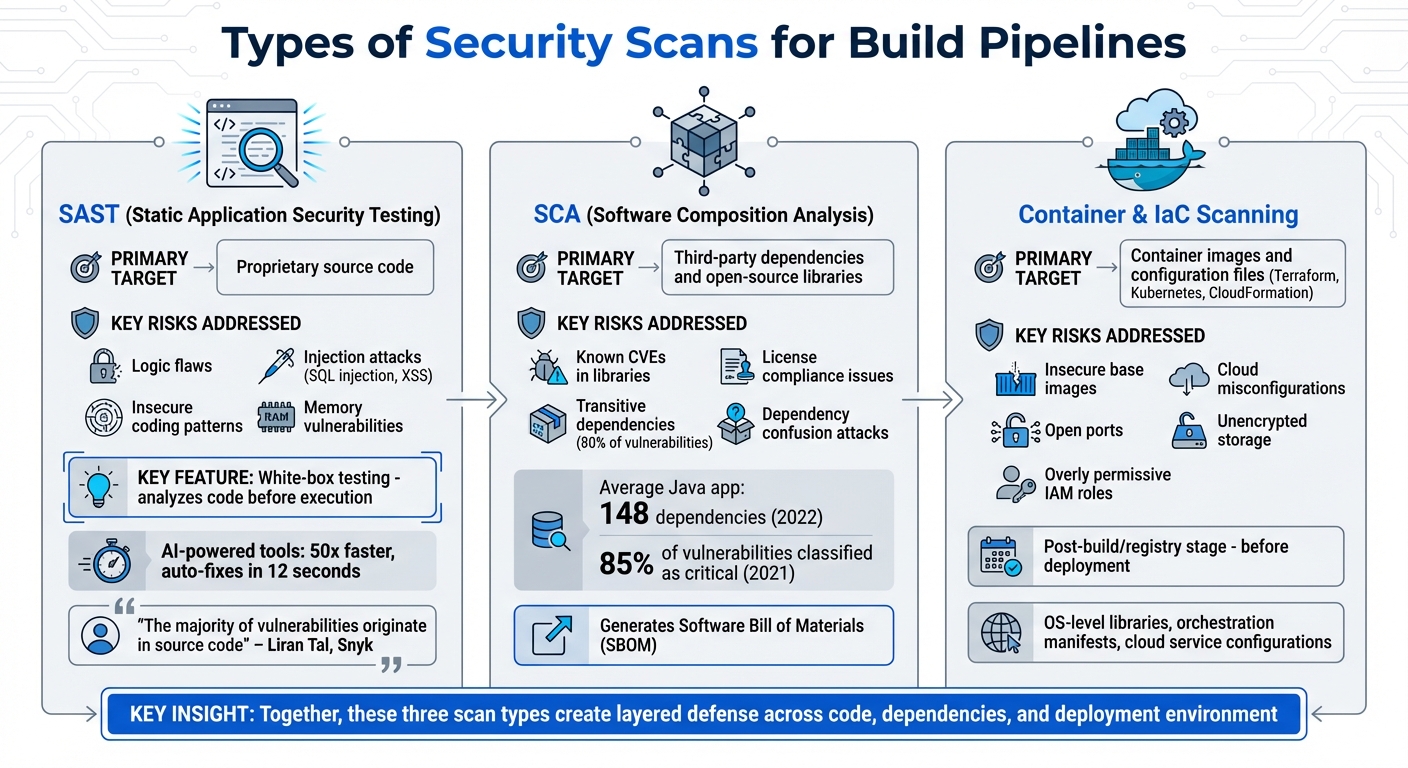
Types of Security Scans for CI/CD Pipelines: SAST, SCA, and Container/IaC Scanning
Security scans target different layers of your pipeline – code, dependencies, and environment – to ensure vulnerabilities are identified and addressed. Three key types – SAST, SCA, and container/infrastructure scanning – work together to safeguard your codebase, third-party components, and deployment environment.
Static Application Security Testing (SAST)
SAST focuses on your source code, analyzing it before execution. Often called white-box testing, it examines logic, data flows, and code patterns to detect issues like SQL injection, cross-site scripting (XSS), and memory vulnerabilities. As Liran Tal, Director of Developer Advocacy at Snyk, points out:
"The majority of vulnerabilities originate in source code."
Modern SAST tools, powered by AI, are up to 50 times faster than older systems and can provide auto-fixes in as little as 12 seconds. By integrating SAST into your IDE or pre-commit hooks, developers receive real-time feedback while coding. This "shift-left" approach resolves issues early, reducing the cost of fixing bugs compared to addressing them post-deployment. While SAST secures your proprietary code, SCA takes on the risks posed by external components.
Software Composition Analysis (SCA)
SCA focuses on third-party libraries and open-source components, scanning for vulnerabilities and license compliance issues. With the average Java application containing 148 dependencies in 2022, manually tracking them is unrealistic. SCA tools cross-reference components against databases like the National Vulnerability Database (NVD) to identify known vulnerabilities (CVEs) and manage licensing risks. Theresa Mammarella, Software Engineer at Sonatype, explains:
"SAST is used to scan the code you write for security vulnerabilities… SCA is used to scan your dependencies for security vulnerabilities."
The real challenge lies in transitive dependencies – the dependencies of your dependencies – which account for about 80% of vulnerabilities and often go unnoticed in manifest files. SCA tools reveal these hidden risks and generate a Software Bill of Materials (SBOM) to ensure transparency. A 2021 report found that every application tested had vulnerabilities, with 85% classified as critical.
Container and Infrastructure Scanning
Beyond code and dependencies, your execution environment needs protection. Container scanning evaluates container images for vulnerabilities in base images and OS-level libraries. On the other hand, Infrastructure as Code (IaC) scanning reviews configuration files – like Terraform templates, Kubernetes YAML, or Ansible playbooks – to catch issues such as open ports, unencrypted storage, or overly permissive IAM roles before infrastructure is deployed. These scans typically occur during the post-build/registry stage, after the container image is created but before deployment.
| Scan Type | Primary Target | Key Risks Addressed |
|---|---|---|
| SAST | Proprietary source code | Logic flaws, injection attacks, insecure patterns |
| SCA | Third-party dependencies | Known CVEs in libraries, license risks |
| Container/IaC Scanning | Container images and config files | Insecure base images, cloud misconfigurations |
sbb-itb-05efa2a
Best Practices for Adding Security Scans to Your Pipeline
Incorporating security scans throughout the development lifecycle helps catch vulnerabilities early, saving time and money. The InventiveHQ Team puts it succinctly:
"DevSecOps isn’t about slowing down releases with security gates – it’s about finding vulnerabilities earlier when they’re cheaper to fix."
Statistics back this up: fixing a bug in production can cost 100 times more than addressing it during development. By embedding strategic scans into your workflow, you can minimize both risks and costs without slowing down delivery. Here’s how to do it effectively.
Using Pre-Commit Hooks
Pre-commit hooks serve as your first line of defense, stopping vulnerabilities before they even make it into the repository. By setting up a .pre-commit-config.yaml file, you can use lightweight tools like gitleaks to detect secrets and bandit or tfsec for code and infrastructure checks. These tools run locally on a developer’s machine, offering immediate feedback without waiting for CI/CD results.
For an even smoother process, IDE plugins for tools like VS Code and JetBrains can flag vulnerabilities in real time as developers write code. This instant feedback allows issues to be fixed while the context is fresh. Pre-commit hooks can also block sensitive data, like API keys or passwords, from being committed. These early checks set the foundation for more thorough scans later in the pipeline.
Build-Time Scans and Deployment Gates
When code moves to the build stage, automated scans should run alongside other build tasks to keep the pipeline moving efficiently. At this stage, tools for SAST, SCA, IaC, and container scanning should work in parallel, with deployments blocked only for critical issues.
To avoid bottlenecks, use tiered enforcement. Critical vulnerabilities can halt the pipeline, while less severe issues are logged for later review. Most well-optimized security scans add just 5 to 15 minutes to the build process.
Managing false positives is equally important. Inline comments or suppression files can help handle known issues without disrupting the workflow. For dependencies, automated pull requests can update outdated or vulnerable libraries with minimal manual intervention. As Qualys emphasizes:
"The goal is not to slow delivery. The goal is to ensure each release is trustworthy, compliant, and aligned with the organization’s risk posture by design."
Post-Deployment Monitoring and Feedback Loops
Security doesn’t stop once the code is deployed. With over 40,000 new CVEs reported annually, continuous monitoring is crucial to address vulnerabilities that surface after deployment. Tools like snyk monitor can take snapshots of the production environment for ongoing tracking.
Daily scans of production containers and infrastructure help identify new risks. Additionally, DAST and IAST tools can be used in staging environments to detect issues – such as broken authentication or misconfigured headers – that might only appear in a live application.
Another critical step is monitoring for manual production changes that could introduce vulnerabilities. By linking runtime findings back to the original source code or Infrastructure-as-Code files, developers can fix the root cause instead of applying temporary patches. Aim to resolve critical vulnerabilities within seven days, tracking your Mean Time to Remediate (MTTR). As Peter De Tender from Snyk puts it:
"The purpose of the shift [left] is to close the feedback loop and provide faster awareness to the results of changes."
Integrate automated scan results with your SIEM for real-time alerts, enabling quicker responses. Finally, appointing security champions within development teams ensures post-deployment feedback is addressed promptly. By tying monitoring efforts back to earlier scanning stages, you create a stronger, more resilient security process.
How Equifier Helps Secure Your Build Pipeline
Creating a secure build pipeline isn’t just about having the right tools – it’s about executing with precision and maintaining constant vigilance. Equifier brings the expertise and services needed to weave security into every phase of your development process, from the first commit to the final deployment. This approach ensures your pipeline is fortified at every step.
Cybersecurity Risk Assessments and Compliance Solutions
Equifier performs detailed risk assessments to uncover vulnerabilities across your entire build pipeline. These assessments cover Infrastructure as Code (IaC) templates like Terraform, CloudFormation, and Kubernetes, helping to prevent insecure cloud configurations from being deployed automatically. Third-party components are also scrutinized to spot hidden vulnerabilities and licensing risks.
By auditing your CI/CD toolchain, Equifier identifies misconfigurations, such as hard-coded credentials, and integrates automated policy checks to ensure compliance. Their secrets detection capabilities further reduce risks by preventing unauthorized access. As Qualys explains:
"Vulnerabilities now enter long before runtime. Risk can originate in dependencies, IaC templates, container base images, and cloud configurations well before software is deployed."
Equifier also brings in external experts to provide a fresh perspective, identifying blind spots that internal teams might miss. This ensures every release aligns with regulatory requirements and security best practices.
But Equifier doesn’t stop at assessments – their team works to seamlessly integrate security throughout your workflow.
DevSecOps Expertise and IT Staffing
Equifier provides skilled professionals to embed security into every phase of development. These experts integrate security controls into your existing toolchains – whether it’s GitHub, GitLab, Jenkins, or Azure DevOps – ensuring security checks are automatic and consistent.
They also implement shift-left security practices, such as setting up IDE plugins for tools like VS Code and PyCharm, along with pre-commit hooks to catch vulnerabilities before code is even committed. Additionally, Equifier’s team configures automated workflows that submit pull requests to address vulnerabilities in open-source dependencies. This allows your team to maintain a secure pipeline without sacrificing speed or efficiency.
Managed Security Services for Continuous Protection
Equifier’s managed services build on proactive scanning to provide continuous monitoring of your environment. With over 40,000 new CVEs reported annually, continuous oversight is crucial. Their services integrate security checks – like SAST, SCA, and DAST – directly into your CI/CD pipeline, triggering scans as code progresses from commit to deployment. They also monitor for configuration drift, ensuring deployments remain secure and compliant as systems evolve. Container images and registries undergo ongoing validation to verify the integrity of artifacts being shipped to production.
Automated policy checks enforce compliance throughout the pipeline, keeping everything on track. As Qualys highlights:
"The future of CI/CD security is risk-based and operational. Security shifts from counting vulnerabilities to measuring and reducing real business risk as part of everyday delivery."
Equifier’s managed services also integrate with your SIEM for real-time alerts and establish security champions within development teams to uphold best practices. This approach addresses a critical reality: fixing a bug in production is 100 times more expensive than addressing it during development. By focusing on continuous protection, Equifier ensures every release is secure and compliant from start to finish.
Conclusion
Integrating security scans into your build pipeline is a key step toward delivering reliable software. Modern applications face a wide range of vulnerabilities, and addressing these issues early in the development process can save significant time and money. Fixing problems during production often involves emergency downtime and complex coordination, making early detection and resolution a much smarter approach.
By incorporating tools like SAST (Static Application Security Testing), SCA (Software Composition Analysis), and container scanning into your CI/CD workflows, your team can minimize risks while staying compliant. As Liran Tal from Snyk puts it:
"Fixing code issues early in the SDLC is much less costly and time-consuming than running all security and quality tests right before production".
Making security an ongoing effort – through automated compliance checks, secrets detection, and continuous monitoring for configuration drift – ensures your pipeline is built with security in mind. Qualys emphasizes:
"The goal is not to slow delivery. The goal is to ensure each release is trustworthy, compliant, and aligned with the organization’s risk posture by design".
Equifier’s managed services offer end-to-end security for your pipeline. Their approach includes everything from risk assessments to continuous monitoring, helping you maintain a secure pipeline without sacrificing development speed. With measures like pre-commit hooks, build-time gates, and post-deployment monitoring, they protect your code, data, and reputation at every stage.
FAQs
How can security scans be integrated into a CI/CD pipeline?
Adding security scans to a CI/CD pipeline means automating tools to catch vulnerabilities as code moves through development and deployment. Commonly used tools include SAST (Static Application Security Testing) for analyzing source code, DAST (Dynamic Application Security Testing) for testing running applications, and SCA (Software Composition Analysis) for checking dependencies.
To keep things consistent, these scanners are often containerized using Docker images. Developers can specify the scanner’s Docker image and include the necessary script commands in the pipeline’s configuration files. This setup ensures that scans run automatically during the build process, analyzing code, dependencies, or container images. Once completed, the results are displayed in the pipeline interface, offering immediate feedback so teams can address issues quickly.
By incorporating these scans into the workflow, teams can identify and fix vulnerabilities early, aligning with DevSecOps principles to deliver secure and dependable software.
What’s the difference between SAST, SCA, and container scanning?
When it comes to spotting vulnerabilities during software development, SAST, SCA, and container scanning each bring something unique to the table.
SAST (Static Application Security Testing) focuses on your source code or binaries. It helps you catch security flaws early – before your application even gets deployed. By analyzing how your code is written, it identifies potential risks at the core of your software.
SCA (Software Composition Analysis) shifts attention to the third-party open-source components and dependencies your application relies on. It flags known vulnerabilities in those components, giving you better control over risks in your software supply chain.
Meanwhile, container scanning zeroes in on container images. It examines the operating system, libraries, and packages inside your containers to root out weaknesses. This is especially crucial for securing containerized apps in cloud-native environments before they go live.
Together, these tools create a comprehensive approach to security, covering your code, dependencies, and containerized setups. Using them in tandem helps ensure a more secure development process from start to finish.
What is shift-left security, and why is it important in software development?
Shift-left security is all about tackling security concerns early in the software development lifecycle (SDLC). Instead of waiting until later stages – or even after deployment – to address vulnerabilities, this approach emphasizes identifying and resolving issues right from the start. Why? Because fixing problems early is not only easier but also far less expensive.
By weaving security checks into the initial phases of development, teams can prevent potential breaches, enhance code quality, and minimize the chances of vulnerabilities being exploited once the software goes live. This method aligns seamlessly with agile workflows and DevSecOps principles, ensuring that security keeps up with rapid development cycles and continuous delivery demands.
Automating testing processes and encouraging a mindset of security awareness across teams are key elements of shift-left security. Together, they boost efficiency while reinforcing the overall security posture of your development practices.