










A Single Source of Truth (SSOT) ensures your team works from one centralized, up-to-date version of your codebase. Without it, scattered repositories, conflicting updates, and wasted time become inevitable. Here’s how you can create and maintain an SSOT:
- Set Clear Goals: Identify pain points in code management, decide what needs centralization (e.g., source code, configurations), and set measurable objectives like reducing merge conflicts or speeding up onboarding.
- Choose a Version Control System: Use tools like Git with platforms such as GitHub. Organize repositories with clear structures, branch naming conventions, and access permissions.
- Standardize Documentation: Include essential files like
README.mdand use tools like JSDoc or MkDocs to automate updates. Focus on explaining the "why" behind code decisions for clarity. - Governance and Quality Control: Protect key branches, automate tests, and enforce rules for code reviews. Assign roles and responsibilities for ownership and compliance.
- Keep It Updated: Regularly audit repositories, monitor performance, and use semantic versioning to manage updates and breaking changes.
This approach minimizes errors, streamlines collaboration, and ensures your codebase remains reliable as your team grows.
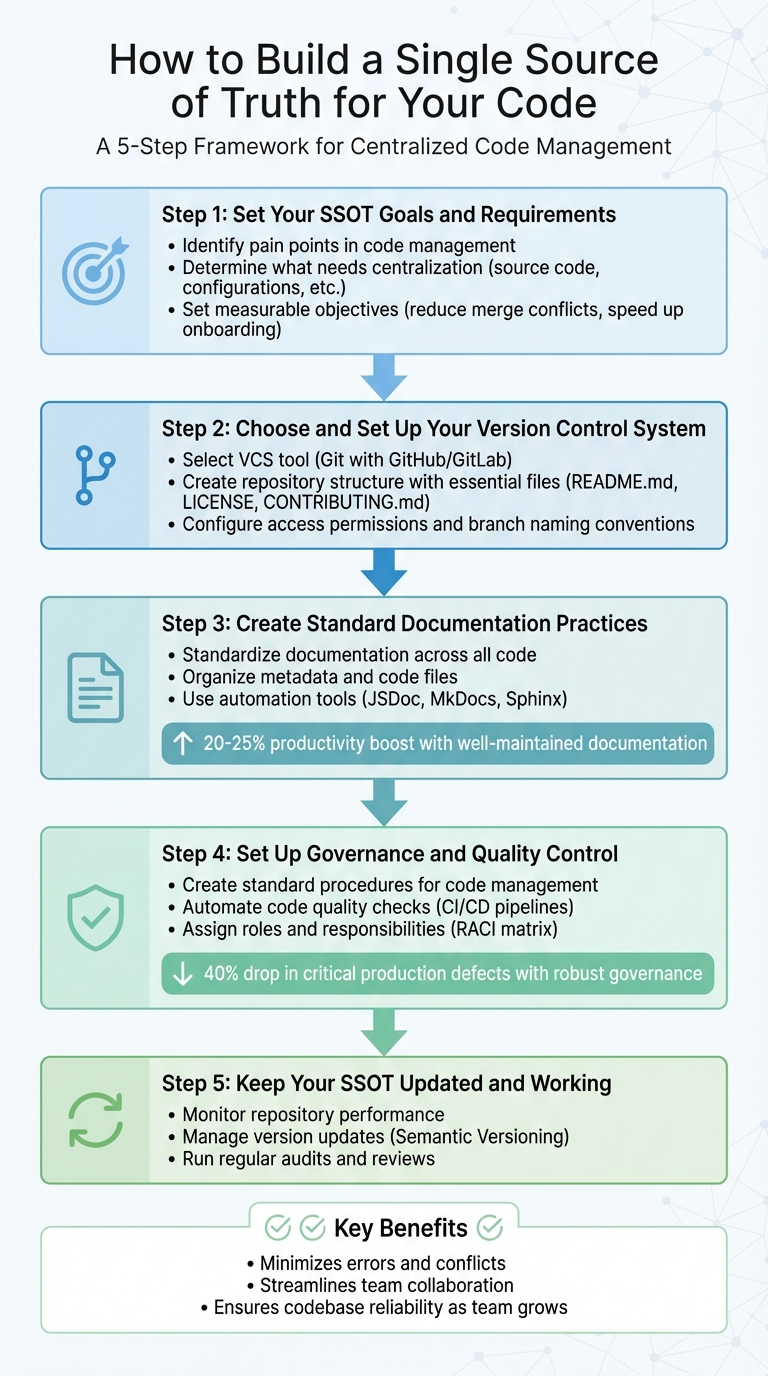
5-Step Process to Build a Single Source of Truth for Your Codebase
Have A Single Source of Truth (In Code!)
sbb-itb-05efa2a
Step 1: Set Your SSOT Goals and Requirements
Before diving into tools, it’s crucial to clearly define the problem you’re trying to solve. A well-structured Single Source of Truth (SSOT) starts with identifying pain points, deciding what truly needs to be centralized, and setting measurable goals that align with your team’s workflow.
Identify Problems in Your Code Management
Start by mapping out where your system is breaking down. Fragmented code management often leads to information overload and scattered tools – teams end up juggling multiple platforms without clarity on where critical information resides. The outcome? Developers waste time searching for documentation, only to find conflicting versions or outdated records.
"One of the biggest challenges in modern distributed architectures is the risk of fragmented change management."
- Bob Reselman, System Architect
Common issues include conflicting edits where one developer unintentionally overwrites another’s work, or files scattered across local drives and cloud folders. Manual documentation also tends to fall out of date quickly. In distributed teams, a single update by one group can inadvertently disrupt another team’s work simply because changes weren’t shared effectively.
Using tools like mind maps or workflow diagrams can help visualize how tasks move from "incomplete" to "done." These visuals often reveal bottlenecks and redundancies that are hard to spot in daily operations. This process helps you decide which assets need to be centralized.
Determine What Should Be Part of Your SSOT
Not every piece of information needs to be centralized. The goal is to focus on assets that are critical for your team’s ability to build, test, and deploy efficiently.
"In most cases, the source code is the single source of truth."
- John Paliotta, Software Testing Expert, Coders Kitchen
Key items to include are those directly tied to your workflow, such as source code, CI/CD scripts, installation configurations, and sandbox setups. Additionally, capturing the reasoning behind decisions – like Architecture Decision Records (ADRs) and design logs – can be invaluable for onboarding new team members or transitioning roles.
Break information into smaller, independent pieces that don’t require extensive context to understand. Assign a specific owner to each asset to ensure it stays valid and updated. Every document, configuration file, or specification should have at least one person responsible for its upkeep.
Once you’ve identified what to centralize, set clear objectives for your system.
Define Goals for Your Centralized System
Establish measurable goals, such as reducing merge conflicts, speeding up developer onboarding, or eliminating duplicate data entries across repositories.
Consider adopting a specification-first approach, where all work – coding, documenting, and updating – stems from a single, controlled specification document (like an OpenAPI or GraphQL schema). This keeps code and documentation in sync, as updates to the specification can automatically trigger changes in dependent resources like documentation websites.
Set benchmarks for component health using scorecards that measure security, test coverage, and deployment readiness. For instance, you might aim for 90% to 100% automated test coverage across all repositories. Use configuration-as-code practices by storing metadata in YAML files within your git repositories, ensuring your SSOT stays updated with every push.
Finally, allocate dedicated time for the migration process. Transitioning to a centralized system requires focused effort to move data from old silos into your new repository without disrupting ongoing work.
Step 2: Choose and Set Up Your Version Control System
The next step in building your SSOT (Single Source of Truth) is selecting and configuring a version control system (VCS). This choice impacts how your team collaborates and how well your codebase can grow and adapt over time.
Pick Your Version Control Tool
Git has been the go-to tool for source control since 2005. It allows developers to work offline with a full local copy of the repository and offers efficient operations.
"Git is the most popular distributed version control system… commonly used for both open source and commercial software development."
- GitHub Docs
When evaluating a VCS, prioritize security features. Look for options with granular access controls, audit logs, and built-in vulnerability scanning. If your project involves large binary files like high-resolution images, Git LFS (Large File Storage) is a helpful extension.
Platforms like GitHub, which hosts over 100 million developers, offer robust tools for both open-source and private projects. GitHub’s free security features for public repositories include Dependabot alerts, secret scanning, and push protection to prevent accidental commits of sensitive data.
Once you’ve chosen a tool, focus on structuring your repository to promote smooth collaboration.
Create Your Repository Structure
A well-organized repository minimizes confusion and supports team scalability. Start by including essential documentation files in every repository, such as:
README.mdfor project overviewLICENSEfor legal use termsCONTRIBUTING.mdto guide contributorsSECURITY.mdfor reporting vulnerabilities
Using an Organization account instead of a personal one is a smart move. It centralizes project ownership and makes it easier to manage multiple repositories under one namespace. You can group users into teams (e.g., frontend, backend, or ops) to streamline permission management across projects.
Establish clear branch naming conventions like feature/feature-name, bugfix/issue-id, or user/alias/description. Protect key branches by enforcing review rules, and opt for a branching workflow instead of forking for internal teams. This keeps development centralized and simplifies the pull request process.
A clear repository structure not only prevents misunderstandings but also strengthens collaboration and security.
Configure Access Permissions and Tool Integrations
To further secure your repository, set up protected branches and create a CODEOWNERS file. This file assigns responsibility for specific files or directories to individuals or teams, ensuring that the right people review changes.
Enable branch protection rules requiring at least one approving review before merging. Push protection features can block commits containing sensitive information, like API keys. Additionally, integrate your VCS with CI/CD pipelines to automate status checks before pull requests are merged, maintaining consistent code quality and system stability.
"For almost all software projects, the source code is like the crown jewels – a precious asset whose value must be protected."
Use team @mentions in pull request comments to notify all relevant members at once. By combining these practices, your repository evolves into more than just a storage space – it becomes a dynamic system that enforces high standards and streamlines collaboration.
Step 3: Create Standard Documentation Practices
To build a strong SSOT (Single Source of Truth), clear and consistent documentation is just as important as having a centralized repository and version control. Without proper documentation, things can quickly spiral into chaos – outdated, inconsistent, or missing information can make your codebase a nightmare to navigate and expand.
Standardize Documentation Across All Code
Start by using a uniform template for all your repositories. Each one should include key files like:
README.md: Provides a project overview.CONTRIBUTING.md: Offers guidelines for new contributors.SECURITY.md: Explains how to report vulnerabilities.
When it comes to inline comments, focus on explaining the "why" rather than the "what." Code should already be clear in its functionality, but comments should provide insight into the reasoning behind decisions – especially business logic. This makes it easier for developers to understand the intent behind the code, even months later.
"Writing impeccable code isn’t just about ensuring compilation success or achieving full test coverage; it’s about ensuring that both humans and computers can understand it."
- Codacy
For major design decisions, consider using Architecture Decision Records (ADRs). These documents capture the context, reasoning, and consequences of architectural choices, serving as a historical reference. This prevents teams from rehashing settled debates and can lead to a 20% to 25% productivity boost when documentation is well-maintained.
Once documentation standards are in place, the next step is to organize your metadata and file structures effectively.
Organize Metadata and Code Files
A clean and consistent directory structure is essential for keeping your codebase manageable. Use a dedicated /docs folder for high-level guides, and stick to standardized naming conventions for files. To avoid sorting headaches, use ISO 8601 format (YYYY-MM-DD) for dates.
Keep directory hierarchies flat – limit nesting to one or two levels. Deep nesting complicates troubleshooting and slows down navigation. For infrastructure code, follow a standard layout with files like:
main.tf(entry point)variables.tfoutputs.tf- Subdirectories such as
modules/,examples/, andscripts/
Implement a tagging system for resources. Tags should include details like Name, AppId, Environment (e.g., dev/test/prod), and CostCenter. When naming variables with numeric values, be specific about the unit – use names like ram_size_gb or disk_size_mib instead of vague ones like size. This reduces confusion and prevents errors in configurations.
To streamline code reviews, assign file ownership using a CODEOWNERS file.
Use Automation for Documentation
Even with standardized practices, manual documentation can quickly fall out of sync with code changes. Automation bridges this gap by keeping documentation up-to-date effortlessly.
Tools like JSDoc, Sphinx, and Doxygen can extract structured comments from your code and generate searchable API reference sites. For API projects, let your specifications drive both the code and the documentation, ensuring alignment with your SSOT.
"Specification First means ‘all work emanates from an ever-evolving but controlled specification. This includes coding, documenting, and enhancing software.’"
- Bob Reselman, System Architect, Red Hat
Automate your documentation deployment with CI/CD pipelines that update websites whenever the main branch changes. Use static site generators like MkDocs or Docusaurus to turn Markdown files into professional-looking documentation. To enforce consistency, integrate tools like linters or StyleCop into your pipelines. These tools can block code merges if required documentation is missing.
Since 58% of developers cite lack of time as their biggest challenge during code reviews, automating documentation updates reduces the manual workload and ensures everything stays current without extra effort.
Step 4: Set Up Governance and Quality Control
Once you’ve established strong version control and standardized documentation, governance becomes the backbone of your Single Source of Truth (SSOT). Clear policies transform your repository into a trusted system for managing code effectively.
In 2022, poor software quality cost U.S. organizations a staggering $2.41 trillion. However, companies that implement robust version control governance see a 40% drop in critical production defects caused by issues like merge conflicts or incorrect deployments. The secret lies in creating clear rules, automating enforcement, and assigning responsibilities across your team.
Create Standard Procedures for Code Management
Protecting your main branch is essential. Set up rules that require pull request reviews and automated status checks to maintain quality.
"To maintain quality of important branches, such as main, while using a branching workflow, you can use protected branches with required status checks and pull request reviews."
- GitHub Docs
Adopt standardized branch naming conventions to enhance traceability and enforce a linear commit history to avoid fragmentation caused by complex merge networks. Every repository should include a CONTRIBUTING.md file, which outlines your team’s collaboration guidelines, commit message format, and review procedures.
Additionally, implement a Definition of Done checklist. This should cover tests, documentation, and security scans that must be completed before merging any pull request. Assigning file ownership can further streamline the review process.
Automate Code Quality Checks
While manual reviews are valuable, automation ensures issues are caught earlier and more consistently. Integrate CI/CD pipelines to automatically run unit and integration tests as soon as changes are committed. This helps teams aim for a change failure rate between 0–15%.
Enable push protection and secret scanning to block commits containing sensitive information, such as API keys or passwords. Use automated configuration audit tools to identify repository misconfigurations and ensure ongoing compliance with governance policies.
Set up required status checks – such as linting, security scans, and dependency reviews – that must pass before merging code. This "shift-left" approach identifies problems early, reducing the chances of expensive rollbacks.
Finally, assign clear ownership to ensure these processes are consistently followed.
Assign Roles and Responsibilities
Governance thrives on clear accountability. Define specific roles for organization owners and repository administrators. A RACI matrix can help clarify who is Responsible, Accountable, Consulted, and Informed for each task.
Implement role-based access control to organize users into teams (e.g., frontend, security) with defined access privileges. Limit administrative access to no more than three owners or admins per organization to minimize the risk of unauthorized changes.
Test new governance rules in "Evaluate" mode to measure their impact without disrupting workflows. GitHub retains a history of rulesets for 180 days, allowing you to review and revert changes if necessary. For emergencies, grant bypass permissions to specific roles and establish "break-glass" procedures, ensuring an audit log review follows every event.
Require multi-factor authentication (MFA) for all developers to enhance security. Regularly review audit logs and bypass events to refine your governance rules over time.
Step 5: Keep Your SSOT Updated and Working
To maintain a dependable SSOT (Single Source of Truth), it’s essential to keep it current and functional. Regular updates and audits play a key role in ensuring it remains a trusted resource for your team.
"In order for something to be a reliable SSOT, it needs to be accessible to all parties that depend on the truth, and it needs to have a way to communicate to those interested parties when the truth changes."
- Bob Reselman, System Architect, Red Hat
Monitor Repository Performance
Keeping an eye on your repository’s performance can help catch potential issues early. Tools like Pulse and traffic graphs provide insights into team activity, helping you identify bottlenecks and monitor overall repository health.
For repositories managing large files, consider using Git Large File Storage (LFS). This prevents your repository from becoming bloated and ensures quick cloning and fetching operations. Additionally, enable automated security tools such as Dependabot for managing dependency vulnerabilities, secret scanning to detect exposed API keys, and code scanning to catch errors before they escalate.
Manage Version Updates and Breaking Changes
Version control is critical when keeping your SSOT up-to-date. Implement Semantic Versioning (major.minor.patch), where major versions signal breaking changes, minor versions introduce new features, and patches fix bugs.
Using Conventional Commits can streamline this process. These structured commit messages can be paired with tools like semantic-release to automate versioning and generate changelogs. For repositories with multiple packages, namespaced tags (e.g., <package-name>-<version>) help avoid version conflicts.
A Specification-First approach can also simplify updates. By using a central specification (such as OpenAPI or gRPC), you can drive changes across downstream code and documentation. Setting up repository service hooks ensures that updates to the specification trigger automated events, keeping everything aligned.
Run Regular Audits and Reviews
Continuous audits are essential for maintaining SSOT integrity. Scheduling regular reviews ensures consistency and highlights any areas needing improvement. For example, Architecture Decision Records (ADRs) and Design Decision Logs should be reviewed to confirm that technical decisions remain relevant and well-documented. Essential files like README, LICENSE, and CONTRIBUTING.md should also be present in every repository to guide contributors.
It’s equally important to periodically review collaborator lists and permissions to prevent unauthorized access. Version control history offers a transparent record of changes, including who made them, when, and why – an invaluable tool for compliance and troubleshooting. Repository graphs and traffic metrics can also help identify performance or data reliability issues.
Finally, automated notifications can be set up to alert teams about updates, ensuring no one is left working with outdated information.
Conclusion
Creating a Single Source of Truth (SSOT) for your codebase is an ongoing process that ensures your team operates from a centralized, consistent, and authoritative source. By implementing the steps outlined in this guide, you can eliminate version discrepancies, avoid conflicting updates, and maintain a unified codebase that everyone can trust. This approach not only simplifies updates but also strengthens the governance practices essential for long-term success.
An effective SSOT minimizes conflicts, promotes collaboration, and maintains a complete history of changes. Centralizing your codebase helps prevent situations where developers accidentally overwrite each other’s work. It also fosters greater code sharing and reuse, as all libraries and modules become visible and accessible to your entire organization. As your team expands, Source Code Management helps reduce communication bottlenecks and simplifies overall project management.
Maintaining SSOT integrity over time requires clear ownership and automated governance. Assigning ownership for files, enforcing branch protection rules, and automating processes like syncing documentation with code changes are all critical steps. Regular audits further ensure that your repository stays accurate and evolves alongside your project.
The effort you put into establishing governance, standard workflows, and quality controls now will save time and resources as your codebase grows. With a well-maintained SSOT, your team can shift its focus from managing fragmented code to building high-quality software that drives meaningful results.
FAQs
What are the advantages of having a centralized source for managing your code?
A Single Source of Truth (SSoT) for managing your code offers numerous advantages that can transform the way your team operates. By centralizing code, configurations, and documentation, it ensures everyone is working with the most current and consistent information. This eliminates the headaches caused by outdated files or duplicate repositories, saving valuable time that would otherwise be spent searching through scattered tools.
Beyond just convenience, an SSoT fosters teamwork. With a shared platform and tools like version control systems, your team can track changes, resolve conflicts swiftly, and maintain a clear history of updates. This not only improves code quality but also makes rollbacks easier and ensures compliance with governance standards.
In short, an effective SSoT brings order and clarity to the often chaotic world of software development, creating an environment where collaboration thrives, and efficiency becomes the norm.
How can we keep our documentation aligned with code changes?
To keep your documentation in sync with code updates, set up a centralized system that works seamlessly with your version control tools. A shared repository – such as wikis or README files – can serve as the go-to location for documentation. By linking these directly to code updates, you ensure that any changes in the codebase are mirrored in the documentation.
Make review and approval workflows a standard part of your development process. This step ensures documentation updates are accurate before they’re finalized. Regularly revisiting and updating your documentation as part of your team’s routine helps maintain consistency. Tools like Git are particularly useful for version control, making it easier to align documentation with the latest code changes, improve collaboration, and minimize errors.
What tools can help automate codebase governance and ensure quality control?
Automating governance and ensuring quality in your codebase becomes much simpler with version control systems like Git. These systems enable processes such as pull requests and branch policies, which help enforce structured reviews and approval workflows. Tools like GitHub take it a step further by offering features like code reviews, branch protection rules, and policy enforcement. These capabilities make it easier for teams to work together and maintain uniformity in their code.
By weaving these tools into your daily workflow, you can improve collaboration, minimize mistakes, and ensure your team consistently follows best practices for managing and maintaining code.
Related Blog Posts
- Where is your proprietary code base? Why you should organize your code in GitHub and use GitHub Actions to manage deployments, security scans, and dependencies.
- Why Every Company Needs a Release Process – Not Just Developers.
- Why Your Software Needs a Supply Chain Security Strategy.
- Why You Need Security Scans in Your Build Pipeline.