








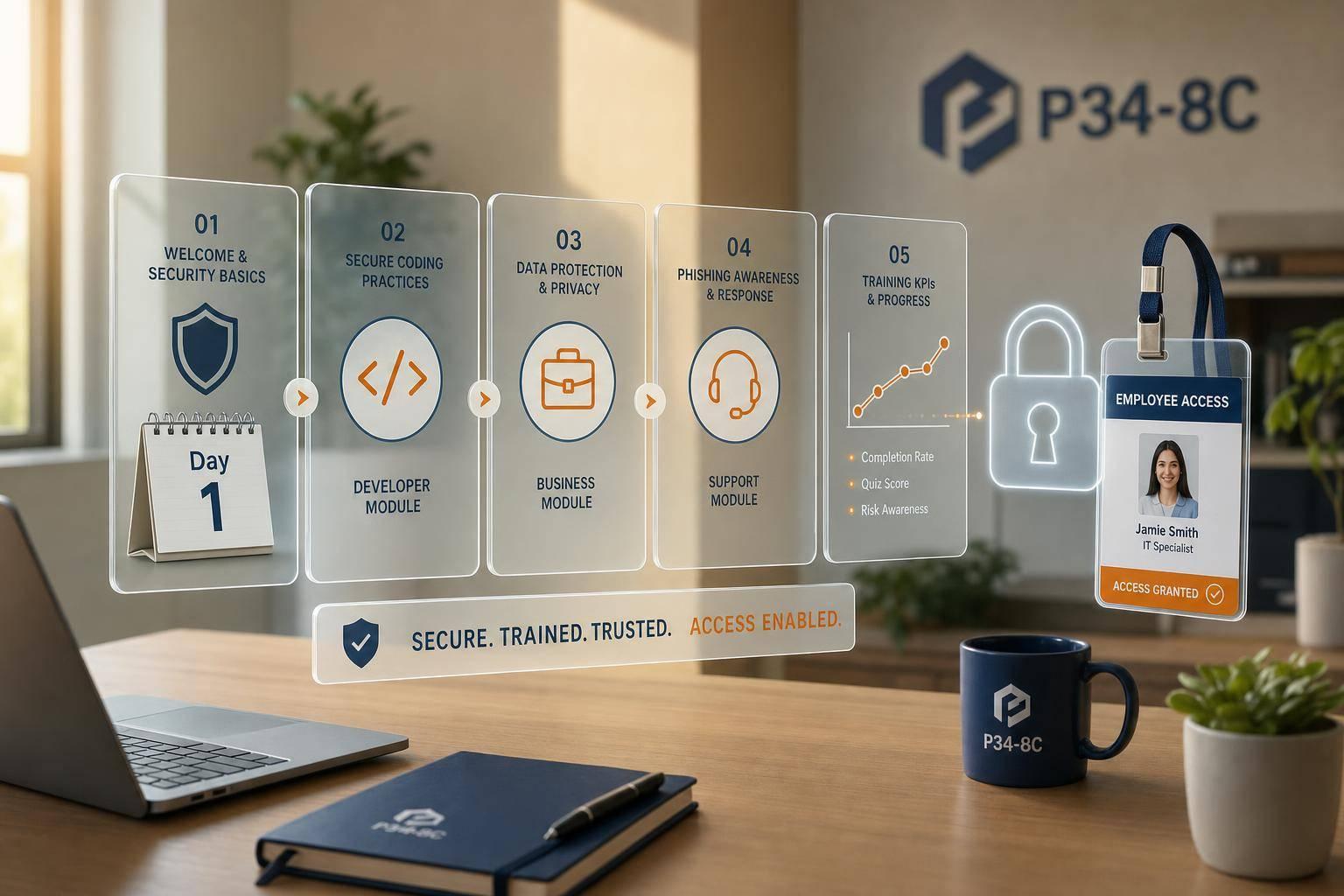

Cybersecurity training should start on day one, not weeks later. If a new IT hire gets access before training, one bad click, one weak setup, or one cloud mistake can lead to data loss, audit trouble, and cleanup costs.
I’d sum the article up like this: train early, tie training to access, split baseline and role-based topics, and track completion with clear metrics. The piece shows why this matters, using data like 74% of breaches involving people and cloud breach issues tied to human error and misconfiguration. It also lays out what new IT hires should learn in the first 30 days, who owns each step, and how to check whether the program works.
If I were boiling it down for a team, I’d focus on these points:
- Start before full access is granted
- Teach baseline security to every IT hire
- Add job-specific training for admins, developers, DevOps, and cloud staff
- Use short modules, guided setup, hands-on labs, and a phishing test
- Set milestones for pre-day-one, day one, first week, and first month
- Split ownership across HR, IT, security, and hiring managers
- Track completion, MFA setup, phishing results, access reviews, and new-hire incidents
- Keep records for audits and use feedback to fix weak spots
One idea runs through the whole article: onboarding is not just orientation. It is a control point where you can limit mistakes before new hires touch production systems, admin tools, or sensitive data.
What new IT hires should learn in the first 30 days
Mandatory baseline topics for every IT employee
The first 30 days aren’t just about orientation. This is when new hires get their credentials, devices, and system access. Security training should happen at the same time, not later.
Set aside a 90-minute security session in week one to cover phishing, password management, device policy, incident reporting, and remote access. Tie each topic to the onboarding step already in motion. For example, cover MFA during credential setup and VPN rules during laptop provisioning. After that, assign role-based training before anyone gets elevated access.
Data classification needs a clear explanation during access provisioning. As new hires are added to file shares, ticketing systems, and code repositories, show them which systems store each data class, how that data may be shared, and which tools are approved for export or download.
For incident reporting, give people one reporting channel and make the point simple: speed matters more than certainty.
Track every topic as a clear checklist item in your HRIS or ITSM system, with due dates inside the first 30 days. Require e-signature acknowledgment for acceptable use, data protection, remote work, and information security policies. For roles with elevated access, hold back production and admin access until training is done.
Role-based modules for admins, developers, and cloud teams
After baseline training, move each hire into the controls tied to the job.
System administrators should complete PAM training in the first month. That includes practicing how to check out privileged credentials, learning just-in-time access workflows, and reviewing admin session logs so they can see what audit visibility looks like. Hardening labs and change management walkthroughs should come next, right when they first build or maintain a system image or submit a change request.
Developers and DevOps engineers should start with secrets management. Secrets do not belong in code, config files, or chat. New hires should set up a dev/test application to pull secrets from the approved vault, whether that’s HashiCorp Vault, AWS Secrets Manager, or Azure Key Vault. They should also rotate a secret to make sure the pipeline handles it the right way. Secure coding basics and CI/CD pipeline security reviews should follow in weeks two through four, before production deploys.
Cloud engineers should focus on IAM and secure configuration in the first month. In practice, that means reviewing the current IAM role model, creating or updating a non-production role under supervision, and deploying a standard resource from approved IaC templates. Looking at Cloud Security Posture Management (CSPM) findings for a test account gives new hires a practical view of misconfiguration in your own environment.
| Topic Type | Audience | Key Concepts | When Covered in Onboarding |
|---|---|---|---|
| Baseline security | All IT hires | Phishing, MFA, password manager, VPN, acceptable use, BYOD, data classification, incident reporting | Days 1–7 (before full access) |
| Role-based | System administrators | PAM, secure configuration, change management, backup & recovery | Days 7–21 (before elevated access) |
| Role-based | Developers & DevOps | Secure coding, secrets management, secure CI/CD, code review | Days 7–30 (before production deploys) |
| Role-based | Cloud engineers | IAM, segmentation, secure templates, CSPM, cloud logging | Days 7–30 (before cloud admin rights) |
Training formats that fit real onboarding schedules
Security training has to match the pace of onboarding. If it doesn’t fit the schedule, people rush through it or miss the point.
Short e-learning modules of 10 to 20 minutes work well for phishing awareness, acceptable use, BYOD, and data classification basics. Place them between HR sessions and device setup during the first five days. Each module should stick to one topic and end with a short quiz to check retention and completion.
Guided setup sessions are best for hands-on tasks like password manager enrollment, MFA setup, and VPN configuration. These can be live or recorded walkthroughs on days one through three, with IT or security checking that each step is done.
Live technical workshops fit best in weeks two through four, once new hires know the tools and the environment. A 60- to 90-minute lab on PAM, secrets management, or secure cloud configuration makes more sense when people have some context. Run these sessions in non-production environments so new hires can make mistakes without causing trouble.
Run a phishing simulation within the first 30 days, usually in week three or four after baseline training is complete. Use it to reinforce reporting habits and measure baseline behavior.
These formats make it easier to match the right training to each onboarding milestone.
sbb-itb-05efa2a
Integrating security awareness training with the employee onboarding process
How to build a security-first IT onboarding workflow
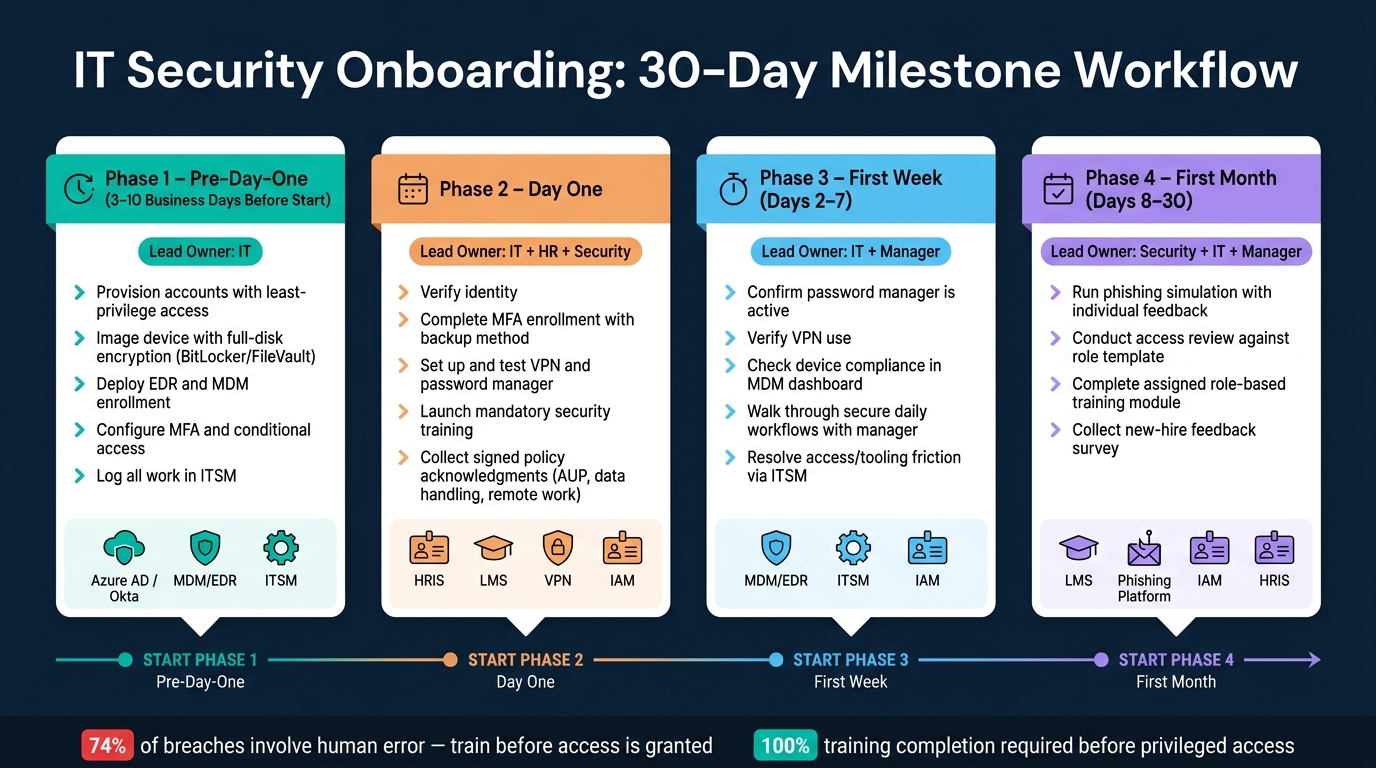
IT Security Onboarding: 30-Day Milestone Workflow
Pre-day-one, day-one, first-week, and first-month milestones
Once the required training is set, put it on a clear onboarding timeline. Training formats and role-based content don’t do much on their own. They need dates, owners, and checkpoints. If those milestones aren’t set, security tasks tend to slip or get missed.
A simple way to do this is to break the workflow into four phases. Each phase should have one lead owner and one security result. Pre-day-one work should happen 3 to 10 business days before the employee starts.
| Phase | Security Tasks | Lead Owner | Systems Involved |
|---|---|---|---|
| Pre-day-one | Provision accounts with least-privilege access; image the device with full-disk encryption (BitLocker/FileVault), EDR, and MDM enrollment; configure MFA and conditional access; log the work in ITSM | IT | Azure AD / Okta / Google Workspace, MDM/EDR platform, ITSM |
| Day one | Verify identity; complete MFA enrollment with a backup method; set up and test the VPN and password manager; launch mandatory security training; collect signed acceptable use, data handling, and remote work policy acknowledgments | IT + HR + Security | HRIS, LMS, VPN, IAM |
| First week | Confirm password manager is active; verify VPN use; check device compliance in the MDM dashboard; walk through secure daily workflows with the manager; resolve any access or tooling friction via ITSM | IT + Manager | MDM/EDR, ITSM, IAM |
| First month | Run a phishing simulation with individual feedback; conduct an access review against the role template; complete the assigned role-based module; collect a new-hire feedback survey | Security + IT + Manager | LMS, phishing simulation platform, IAM, HRIS |
This kind of setup keeps the process from turning into a scramble. Instead of asking, "Did anyone set up MFA yet?" or "Who owns the access review?", each step has a place on the calendar and someone tied to it.
How HR, IT, security, and managers share responsibility
A workflow only works when each team knows what it’s on the hook for. If ownership gets fuzzy, tasks fall through the cracks, and those gaps often show up at the worst time.
HR starts the process. Once the start date is confirmed, HR adds the new hire to the HRIS, assigns required training in the LMS, and collects policy acknowledgments. HR also handles compliance paperwork like NDAs and confidentiality agreements before full system access is approved.
IT runs the technical side. That includes provisioning accounts from role templates, setting up devices, enforcing MFA and conditional access, and deploying endpoint protection. IT also owns first-day access support and fixes technical blockers that show up during the first week.
Security sets the rules of the road. The team builds the baseline security curriculum, defines minimum device and account settings, decides which apps need MFA, and watches program performance through metrics and audits.
Hiring managers make the process stick in day-to-day work. They reinforce safe habits inside the team’s actual workflow. That matters because early correction of unsafe shortcuts does more than any single training module.
The owner map doesn’t need to change from team to team. What changes is the tool used to run the workflow. Once ownership is clear, it’s much easier to track what’s happening and spot where the process needs work.
How to measure and improve onboarding training effectiveness
KPIs that show whether the program is working
Once onboarding milestones are set, the next step is simple: check if the program changed behavior and cut mistakes. Attendance alone doesn’t tell you much.
The table below links each KPI to its data source, the threshold to aim for, and how often to review it. These are common starting points for a security-aware onboarding program.
| KPI | Data Source | Target Threshold | Frequency of Review |
|---|---|---|---|
| Training completion before access | LMS, HRIS, IAM logs | 100% before privileged access is granted | Weekly + monthly audit |
| Quiz/assessment passing rate | LMS reports | ≥ 85–90% on core modules | Monthly |
| MFA enrollment for new IT staff | IAM / SSO admin dashboards | 100% of admins within 48 hours | Weekly |
| Policy acknowledgment completion | LMS / HRIS signed acknowledgment records | 100% of IT hires within first week | Weekly |
| Phishing click rate (new hires) | Phishing simulation platform | < 10% in month one; < 5% within 6 months | Monthly |
| Phishing report rate (new hires) | Phishing platform / SIEM | > 20–30% in month one; > 30–40% ongoing | Monthly |
| Access review completion (30 days) | IAM, GRC, or ticketing system | 100% of new IT hires reviewed | Monthly |
| Onboarding-related security incidents | Ticketing / SOC records | Downward trend; zero critical incidents | Quarterly |
NIST summaries show that training completion and phishing click rates are the most-used effectiveness measures. That combo makes sense. Completion shows people were exposed to the material. Click rates show whether that training changed what they do when a risky message lands in their inbox.
Two metrics need extra focus. Training completion before access is granted is a direct sign that controls are being enforced. If a new admin gets production access before finishing the baseline security module, there’s a hole in the onboarding flow that needs fixing.
The other one is onboarding-related security incidents. This includes misconfigurations, improper data sharing, failed MFA enrollment, and policy violations. Those incidents are the clearest outcome signal. If they keep showing up, the program isn’t doing its job. Track them quarterly and look for a downward trend over time. That’s one of the most practical ways to tell whether onboarding is cutting day-to-day risk.
Documentation, feedback loops, and ongoing education
After the numbers, you need records to back them up.
Auditors for SOC 2, ISO 27001, HIPAA, and NIST-aligned programs want proof of who completed which course version, when they completed it, and what score they earned. HIPAA requires training records to be kept for six years from creation or last effective date, whichever is later.
Three systems handle most of this work. The LMS stores course completion dates, quiz scores, certificates, and policy acknowledgments, along with the policy version each employee signed. The HRIS connects each person’s role and start date to the right training path. The ticketing system records access requests and approvals, shows that training was completed before access was granted, and logs security issues tied to new hires for later review.
That same data should also shape the next onboarding cycle. Around day 30, send a short survey that asks about clarity, relevance, and format. Have managers share whether new hires can follow secure workflows without hand-holding. Then review survey results, manager input, and incident trends each quarter and adjust the timing, content, or enforcement as needed.
After day 30, use microlearning to patch weak areas. Then run quarterly refreshers tied to phishing results, policy updates, and major technology changes. Promotions and role changes should trigger added training before new access is granted.
Conclusion: Align hiring, security, and onboarding execution
Put together, these steps make onboarding a security control, not just an orientation task.
Strong cybersecurity onboarding starts on or before day one. It combines baseline awareness with role-based training, follows a 30-day workflow, and tracks completion through KPIs and audit records.
The first 30 days should lock down access, training, and validation before new hires touch production systems.
After onboarding, managers should keep security expectations active through goals, coaching, and refresher training. That change moves security from a one-time training event into everyday work.
HR, IT, security leaders, and hiring managers need to share ownership. Outside help can also fill gaps when teams need recruiting, consulting, or implementation support. For teams that need help aligning recruiting, cybersecurity consulting, and IT services with secure onboarding, Equifier can support the process.
FAQs
Why should security training happen before full access?
Security training needs to happen before full system access. That gives new hires, including contingent workers, a chance to spot and respond to threats like phishing and social engineering from day one.
When you build training into onboarding, security steps are more likely to get done on time. It also helps teams spot weak points early and makes sure employees understand key policies and incident reporting procedures before they touch sensitive systems.
What training should every new IT hire complete first?
Every new IT hire should start onboarding with cybersecurity training. That training should cover the basics that matter on day one:
- company security policies
- threat awareness
- incident reporting
- phishing recognition
- strong password practices
This gives new team members a clear picture of how your company handles risk before they touch key systems or data.
Equifier supports this work with cybersecurity consulting and compliance solutions that help teams get ready to protect organizational infrastructure from the start.
How do you measure whether onboarding security training works?
Measure effectiveness with a mix of quantitative and qualitative metrics.
Simulated exercises like phishing tests can show how prepared employees are and point out where more training is needed. Compliance monitoring tools can track completion status and show whether employees meet security standards.
It also helps to look at skill assessments, project performance, employee feedback, audit trails, and automated reports. These give you a clearer picture of training completion and day-to-day adherence to security protocols.