









Poor IT support costs more than time – it can cost your business a lot of money. The fix is usually simple: measure where tickets slow down, route all requests into one system, automate repeat work like password resets, standardize devices and tools, and review results every 60 to 90 days.
If I had to boil this down, I’d focus on four moves:
- Find the biggest support gaps first with 3–6 months of ticket data
- Put every request into one queue across email, chat, phone, and portal
- Automate common tasks and shift simple work to self-service or Level 1
- Track MTTR, FCR, backlog, SLA results, and CSAT to see if changes work
A few numbers stand out:
- More than 90% of mid-size and large firms report downtime costs above $300,000 per hour
- Password resets can account for about 30% of tickets
- Healthy first-contact resolution often lands around 70%–75%
- CSAT should usually be 85% or higher
- Backlog older than 5 business days should stay well below 10%
In plain terms: if your team has unclear ownership, scattered intake, slow approvals, and too many repeat tickets, support will drag. If you fix those four areas, you cut delays, reduce ticket volume, and make support easier for both IT and employees.
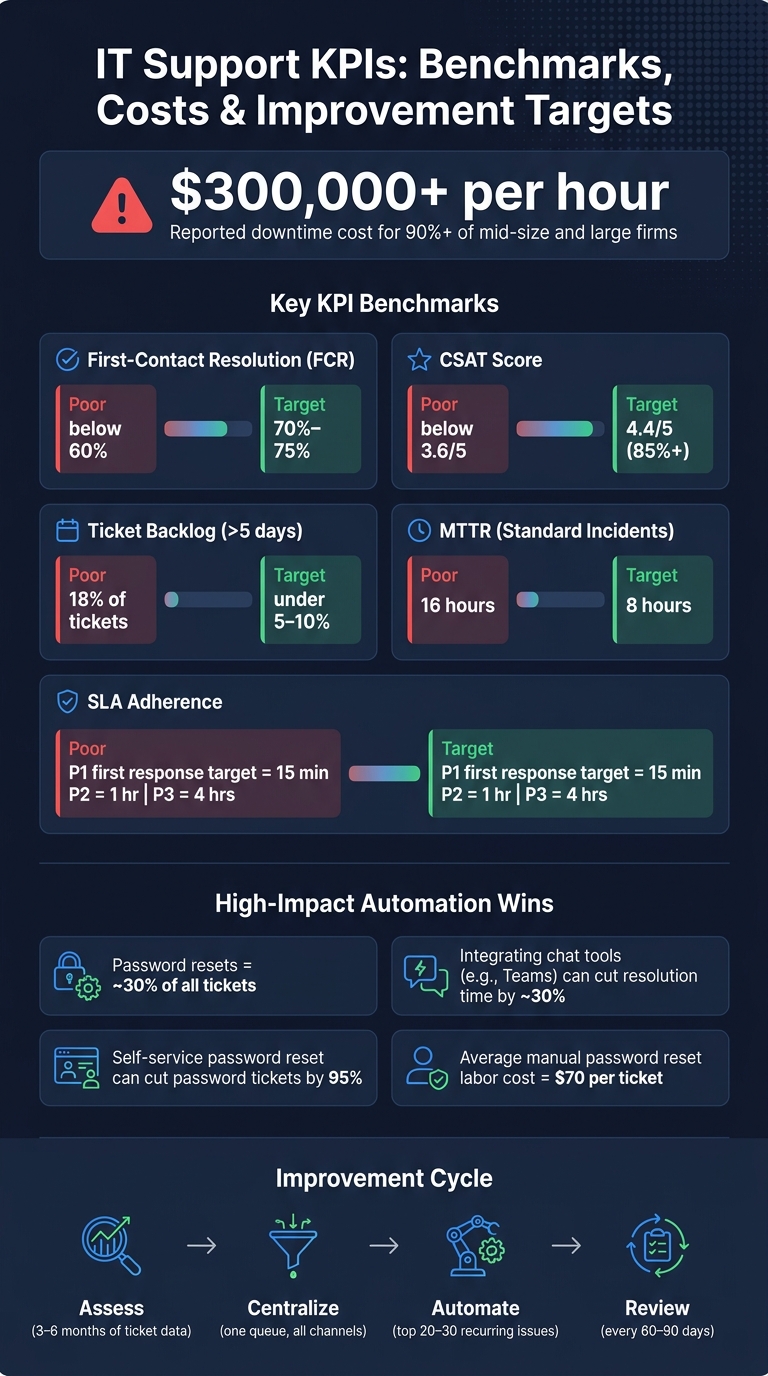
IT Support KPIs: Benchmarks, Costs & Improvement Targets
5 Ways to Improve IT Service Desk for a Better End User Experience
sbb-itb-05efa2a
Step 1: Assess Current Support Performance and User Pain Points
Start with the KPI baseline from the introduction and use it to spot the biggest breakdowns first. List every support channel your team uses. Then export at least 3–6 months of ticket data and log ticket volume, first-response time, and resolution time. That makes it much easier to see which channels are overloaded and which ones barely get used.
Next, map your ticket categories. The issue types with the most tickets usually cause the biggest delays. Password resets and account lockouts are often near the top of the list, and password resets alone can make up about 30% of tickets in many support centers. If your queue is packed with access issues, device trouble, or problems tied to one app, that’s the place to start. Review ticket histories and look for where requests get stuck. For instance, if access requests keep sitting for 10+ hours waiting for manager approval, the bottleneck isn’t just inside IT, but it still drags down support performance.
Use a gap table like this:
| Metric | Current State (Example) | Target State | Risk If Unchanged |
|---|---|---|---|
| MTTR (standard incidents) | 16 hours | 8 hours | Lost productivity; missed internal SLAs |
| First-contact resolution | 55% | 75% | High escalation load; longer wait times |
| Ticket backlog (>5 business days) | 18% of tickets | <5% of tickets | User frustration; shadow IT workarounds |
| CSAT score (1–5 scale) | 3.6 | 4.4 | Lower employee engagement; negative feedback |
A backlog above 10–20% after 5 business days usually points to understaffing, weak prioritization, or missing automation. CSAT comments that mention slow response, unclear status, or too many handoffs usually point to those same root causes. That’s where the numbers start to tell a human story.
Collect Short, Actionable Feedback From End Users
Use the data to spot patterns, then use feedback to explain them.
Metrics show what is broken. User feedback shows why. Even so, only about 49% of employees say their service desk actively asks for feedback. That’s an easy gap to close.
Keep post-ticket surveys short: 3–5 questions, sent automatically after closure. A simple format works best:
- Overall satisfaction rating (1–5)
- Speed rating (1–5)
- Yes/no: was the issue fully resolved?
- One open-text question, such as "What would have made this faster or clearer?"
Response rates usually land in the 20–40% range when users know the survey takes less than a minute. Review comments on a regular basis. Themes like didn’t know who to contact or had to reset password multiple times can turn straight into a short list of fixes.
For a broader view, run 30-minute structured interviews with business process owners in high-volume areas like sales, customer service, finance, and operations. Bring your ticket data with you and ask which issues disrupt work the most, where requests stall, and which steps feel unclear. These talks often uncover friction that never shows up in a ticket at all, like employees bypassing IT because the process feels too slow. Use what you learn here to decide what to standardize in Step 2.
Step 2: Centralize Intake and Standardize Support Processes
Once you know where support is slipping, the next step is simple: stop letting requests live in five different places. If tickets are spread across inboxes, chat threads, and phone notes, your team loses time before work even starts. Route every request into one ticketing queue.
Set Up a Centralized Portal, Ticketing System, and Omnichannel Intake
A single intake model ties your portal, email, phone, and chat into one ticketing system. That means every channel feeds the same queue with the same categories, priorities, SLA rules, and assignment groups. The payoff is pretty direct: faster first response, cleaner backlog data, and fewer duplicate tickets.
The intake form plays a bigger role than many teams think. Keep it short. Ask what the user needs, which service is affected, and how much impact it has. Use dynamic fields so people only see follow-up questions that fit their issue type. Auto-fill name, department, and location from Active Directory so users don’t have to type data the system already has. Aim to keep the form under 2 minutes, with 80%–90% of tickets landing in the right category on the first submission.
| Intake Method | Tracking Quality | User Effort | Control Over Process | Analytics |
|---|---|---|---|---|
| Email-only | Inconsistent; high risk of missed or duplicate tickets | Low – users just send an email | Limited; hard to enforce fields or SLAs | Weak; difficult to segment by category or root cause |
| Portal-only | Strong; all tickets structured and logged | Medium – users must log in and learn the portal | High; enforces required fields, workflows, and approvals | Strong; rich data for trend analysis |
| Omnichannel | Strong; all channels feed one system and ticket ID | Low–medium; users choose their preferred channel | High; centralized rules, SLAs, and routing with flexibility | Very strong; analyze by channel, type, group, and business impact |
Email-only intake tends to split up tickets and makes reporting harder. If you connect collaboration tools like Microsoft Teams straight to your ticketing system, you can also cut resolution times by around 30% by removing friction from intake and communication.
Once everything flows into one queue, the next job is making sure each ticket type moves the same way every time.
Document Workflows for Incidents, Requests, and Escalations
With intake centralized, you need a clear path for each kind of ticket. ITIL separates incidents, where something is broken, from service requests, where someone needs something. Tying these workflows to the problems found in Step 1 – stalled approvals, murky escalation paths, and slow routing – helps trim the handoffs that stretch out resolution time.
For incident management, define a plain sequence:
- Log
- Categorize
- Prioritize
- Diagnose
- Resolve
- Close
Give each stage an owner. The service desk should handle triage, while Level 2 takes on more complex diagnosis. For high-priority incidents, set communication checkpoints so users get steady updates instead of silence.
For request fulfillment, use catalog templates for common work like new-hire onboarding, software installs, and application access. Each one should have preset approval steps and SLA targets. For escalations, spell out time-based triggers. For example, a P1 should move to the on-call manager if it isn’t resolved within 2 hours, and to the director at 4 hours.
SLAs need to be specific and tied to U.S. business hours. A solid baseline is:
- 15 minutes for first response on P1 incidents
- 1 business hour for P2
- 4 business hours for P3
Measure those against defined support hours such as 8:00 a.m.–6:00 p.m. CT, Monday through Friday, excluding U.S. federal holidays. Store all workflows in one knowledge base, link them inside tickets, and use them during onboarding so every agent handles the same issue the same way.
Clear workflows reduce handoffs and help close tickets faster.
Automate Repetitive Tasks and Move Simple Work to Lower Support Tiers
Password resets can eat up a surprising amount of support time. Forrester estimates the average IT labor cost of one manual password reset at $70 per ticket in full-service environments. Self-service password reset, tied to Azure AD and protected with multi-factor verification, can cut password-related help desk tickets by 95% and produce ROI within 3–6 months.
Passwords are only the start. You can also automate standard access provisioning for new hires by role and department, software distribution after manager approval, ticket routing by category and location, and SLA breach notifications. These tasks show up often, follow the same pattern, and don’t need much judgment. That’s what makes them strong candidates for automation. Approval steps can still stay in place, and every automated action should be recorded in an audit trail.
Then shift routine work left. Move it to self-service or Level 1 so senior engineers can spend time on issues that need deeper skill. Start with your top 20–30 recurring issues, write clear knowledge articles for each, and train Level 1 agents on standard runbooks so they can solve more issues on first contact. That cuts repeat ticket volume, improves first-contact resolution, and frees up room for harder incidents.
Track First Contact Resolution rate closely. The industry benchmark is 70%–75%, and anything below 60% usually points to gaps in tooling or training.
Start with the work that shows up the most and takes the least judgment.
Equifier can source experienced ITSM professionals and support centralized service delivery.
Step 3: Improve Tools, Endpoints, and Team Capability
Once intake and workflows are set, delays usually show up somewhere else: the device itself, the support setup, or the person handling the ticket. In most cases, the next slowdowns come from mixed device fleets, weak remote support, and uneven agent skill levels.
Standardize Devices, Remote Support, and Endpoint Controls
When your team supports fewer device types, troubleshooting gets easier. Agents spend less time figuring out what they’re looking at, and fewer tickets need to be passed up the chain. A simple move is to standardize on two or three laptop models and keep standard Windows and macOS builds ready to go.
Those builds should include the basics from day one:
- Disk encryption
- An EDR client
- VPN
- Microsoft 365
- A remote support agent
That setup matters because it cuts out a lot of back-and-forth. If remote access is already installed and working, the agent can jump in fast instead of walking the user through setup while the clock keeps ticking.
It also helps to keep a living asset inventory tied into Microsoft Intune or Jamf. Each endpoint should carry a unique ID, owner, department, location, and patch status. Then, when a ticket comes in, the agent can see the device, OS version, and patch state right away. No guessing. No hunting through spreadsheets. No asking the user to read tiny system details off a screen.
For patching, staged rollouts are the safer path:
- Start with a pilot group
- Move to a broader deployment
- Finish with full rollout
- Use automated compliance reporting after each ring
That kind of structure helps teams catch problems early without turning one bad patch into a company-wide mess.
Standardized endpoints make support faster. Trained agents make it steady.
Train the Support Team in Technical and Communication Skills
Your agents need solid technical skills, but that’s only half the job. They also need to explain problems clearly, calm people down, and set expectations without sounding robotic.
A modern U.S. service desk should be comfortable with current Windows and macOS versions, Microsoft 365, Azure AD, VPN troubleshooting, and the business-critical apps people use every day. Basic PowerShell or shell scripting helps too. It gives agents a way to build repeatable fixes instead of doing the same manual steps again and again.
Communication training deserves just as much attention. Good support isn’t only about fixing the issue. It’s also about helping the user feel like someone has the situation under control. Short response scripts can help agents acknowledge the impact, restate the issue, and explain the next step in plain English.
A few hands-on training methods work well here:
- Role-play incident scenarios
- Review calls with coaching
- Use peer feedback to reinforce good habits
Over time, that kind of repetition leads to steadier responses. It also cuts down on follow-up tickets and helps users stay calmer during high-pressure outages.
Use Equifier for IT Staffing and Support Environment Improvements

Equifier can provide full-time or contract IT support staff, along with targeted cybersecurity or infrastructure reviews, when you need to close a skills, compliance, or performance gap fast.
As tools improve and the team gets sharper, track the impact in MTTR, FCR, backlog, and CSAT.
Step 4: Measure Results and Build a Continuous Improvement Cycle
After you centralize intake, automate routine work, and standardize endpoints, the next step is simple: check if support is getting better.
Track KPIs and Report Changes in Business Terms
Measure whether your process and tool changes are cutting repeat work and response delays. Track MTTR, FCR, backlog aging, SLA adherence, and CSAT. Use target ranges to see if service is moving in the right direction. Then break each metric out by priority, category, channel, and tier so you can spot where performance is shifting.
Numbers matter, but business impact matters more. Report 90-day changes in terms people can act on: employee hours saved, fewer repeat contacts, and fewer missed service commitments.
Use 60- to 90-Day Review Cycles to Refine Support
Once the trend line is clear, use the next review cycle to go after the biggest root causes. Review KPI trends every 60 to 90 days, group recurring tickets by root cause, choose the fix with the biggest impact, put it in place, and measure again in the next cycle.
Start with issues that show up often and follow the same pattern. Password resets, access provisioning delays, and endpoint setup problems are usually the first areas to check after implementation because they often respond well to self-service or automation.
After those are under control, shift to the root causes behind repeat tickets, such as inconsistent device images or poor escalation routing. In the next cycle, confirm that the fix worked – or change course if the same issue is still showing up near the top.
FAQs
Where should we start?
Start by looking at your current IT support capacity. Check for early warning signs like skill gaps, delayed projects, or security risks.
If those problems are already hurting continuity or putting more stress on your team, it may be time to add qualified IT support staff – full-time, contract, or a mix of both – to steady day-to-day work and ease burnout.
Which IT support KPIs matter most?
The most important IT support KPIs are the ones tied directly to user experience and service reliability.
That usually means keeping a close eye on service success rate with a target of 90%+, along with SLI/SLO attainment, MTTR, response times, error rates, uptime, and change success and failure rates.
It also helps to track deployment frequency and lead time for changes. Those two metrics can show where the process is slowing down and where regressions are slipping in.
What should we automate first?
Start with high-risk tasks where mistakes can have serious consequences. Automation is especially helpful for cutting manual errors in regression testing, deployment, and security scanning.
It also makes sense to focus on routine maintenance, such as patch management, user lifecycle management, and log analysis. That helps reduce vulnerabilities and supports steady compliance.