








If threat data does not change tickets, patch order, or incident actions, it is just extra noise.
I’d sum up the article like this: start with the IT decisions you want to change, connect threat data to the tools your teams already use, and then measure whether response and patching improve. The best first targets are usually vulnerability management, incident response, ITSM ticketing, change management, and compliance reporting.
Here’s the short version:
- I’d define a few clear use cases first, such as:
- reprioritizing CVEs under active exploitation
- auto-opening high-priority tickets for likely credential theft or lateral movement
- adding risk context to emergency change requests
- I’d connect threat data into TIP, SIEM, SOAR, and ITSM only where it leads to action
- I’d push that context into:
- alerts
- tickets
- patch queues
- risk and audit records
- I’d score vulnerabilities using more than CVSS, including:
- CISA KEV status
- exploit activity
- asset criticality
- internet exposure
- I’d automate low-risk steps like enrichment, deduplication, and alert-to-ticket creation
- I’d keep people involved for higher-impact actions like endpoint isolation or account disablement
- I’d track results with metrics such as MTTD, MTTR, time to patch exploited CVEs, and false-positive rate
A few numbers stand out. The article notes that 70% of teams use threat data to improve incident response, 60% use it for vulnerability prioritization, and only 36% measure whether the work pays off. That gap is the main point: integration only matters if it changes outcomes you can track.
If I were putting this into practice, I’d keep the plan simple: pick the decision, name the owner, connect the data flow, route it into work queues, and review the metrics each month.
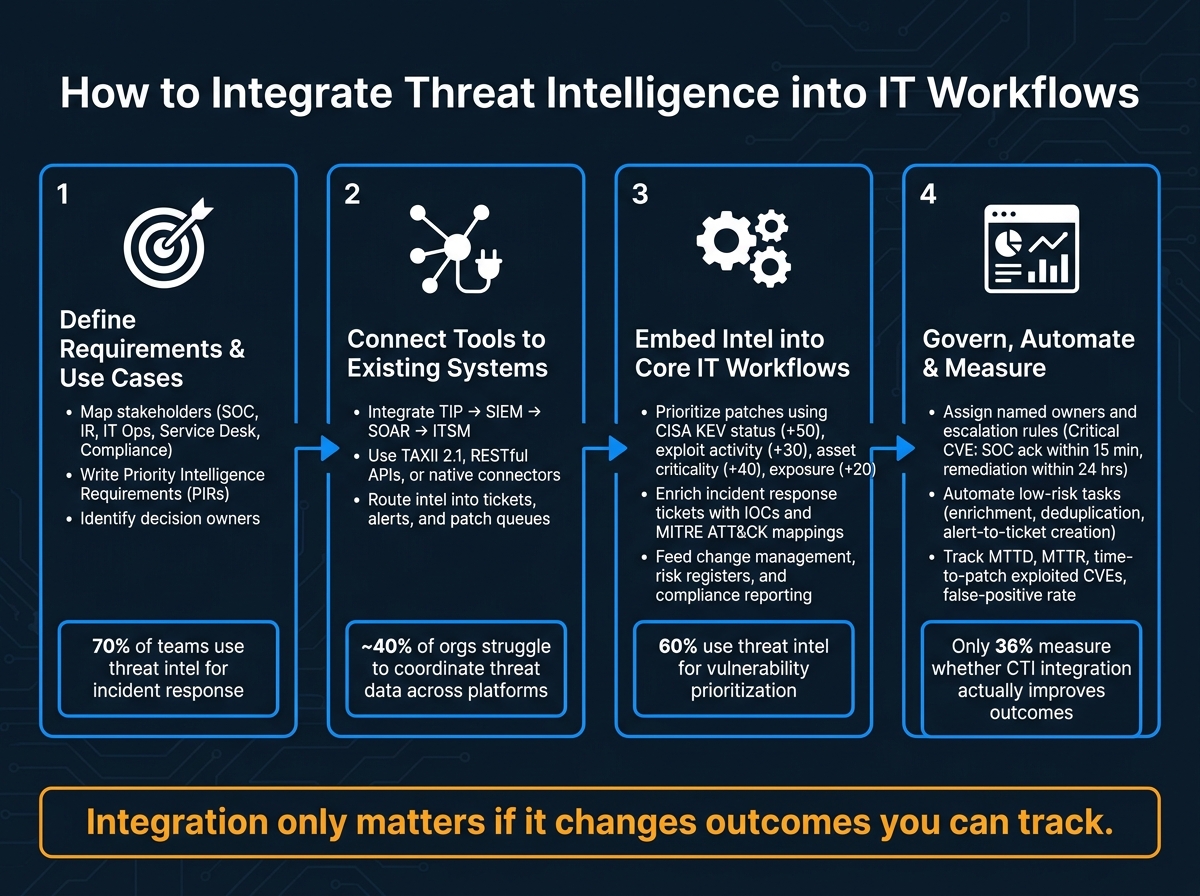
How to Integrate Threat Intelligence into IT Workflows: 4-Step Framework
Building Threat Intelligence Workflows for Real-World Security Operations
sbb-itb-05efa2a
Step 1: Define Requirements, Stakeholders, and Priority Use Cases
Start with the decision that intelligence needs to change, not the platform. Nail down the decision, the owner, and the workflow before you pick a feed. Once those decision points are clear, map who owns each workflow and what each team needs from the intelligence.
Map Stakeholders Across Security, IT Operations, and Compliance
Spell out what each team needs.
- The SOC needs real-time context.
- IR needs TTPs and playbooks.
- IT ops needs vulnerability data tied to asset priority.
- The service desk needs ticket guidance so staff can route issues the right way.
- Compliance needs audit evidence.
A simple RACI matrix helps keep intelligence from getting stuck in the SOC. It shows who is Responsible, Accountable, Consulted, and Informed for each workflow, so the teams that need to act can do so without confusion.
Swimlane diagrams help too. They make the handoffs plain by showing how intel moves from ingestion through SIEM or SOAR and into tickets, patch queues, and change requests.
Write Priority Intelligence Requirements for IT Decisions
Priority Intelligence Requirements (PIRs) are focused questions that tie intelligence collection to a specific decision. Each PIR should connect to one decision, stay within a clear scope, and include a time limit.
Here are two examples:
- Which vulnerabilities affecting our Windows servers are being actively exploited in the wild and have public exploit code available, and how do they map to our most critical assets? – owned by the vulnerability manager, with a remediation SLA of 3 business days for critical CVEs.
- Which alerts in our SIEM should automatically open high-priority tickets in our ITSM tool because they indicate likely credential theft or lateral movement? – owned by the SOC manager, with acknowledgment required within 15 minutes of ticket creation.
According to a survey of 196 security professionals, 70% identified vulnerability prioritization as their top use case for threat intelligence, and 65% use it for incident response.
Those two use cases usually give teams the clearest near-term payoff. They tie directly to patching, alert handling, and ticket flow. Threat hunting and advance warning can come later, once the basics are working.
After PIRs are set, connect them to the systems that will carry the data into tickets, alerts, and patch queues.
When to Bring in Outside Expertise
A few signs make the need for outside help pretty clear. Maybe your team has no dedicated threat intelligence or security engineering staff. Maybe tools like SIEM or EDR are in place but barely tuned or lightly used. Or maybe there are no documented PIRs at all.
Cyware found that nearly 40% of organizations struggle to coordinate threat data across TIPs, SIEMs, and vulnerability platforms.
In cases like that, bring in cybersecurity consulting support or contract threat intelligence analysts to run stakeholder workshops and produce concrete outputs such as RACI matrices and workflow diagrams. The key is to pair those outside specialists with internal owners and keep all documentation in-house. That setup makes the next step – tool and workflow integration – a lot faster.
Step 2: Connect Threat Intelligence Tools to Existing Systems
Once your PIRs show which decisions need to change, the next move is simple: connect the tools that turn those decisions into day-to-day action. The goal isn’t to pile on more software. It’s to make the systems your teams already use smarter with better data.
Pick the Right Integration Points: TIP, SIEM, SOAR, and ITSM
Connect these tools in the same direction the data travels through your workflow.
| Tool Type | Primary Role | IT Workflow Touchpoints | Example Platforms |
|---|---|---|---|
| TIP (Threat Intelligence Platform) | Aggregates and distributes indicators from multiple feeds | Enrichment, indicator scoring, block list distribution | Anomali, Recorded Future |
| SIEM (Security Information and Event Management) | Correlates enriched indicators with local logs to generate prioritized alerts | Alert triage, incident dashboards, threat-hunting queries | Splunk Enterprise Security, Microsoft Sentinel, IBM QRadar |
| SOAR (Security Orchestration, Automation, and Response) | Automates playbooks for enrichment, triage, containment, and ticket creation | Alert queues, firewall and EDR actions, ITSM ticket creation | Palo Alto Cortex XSOAR, Splunk SOAR |
| ITSM (IT Service Management) | Manages incidents, change requests, and patch queues using CTI-enriched data | Incident management, patch prioritization, change approvals | ServiceNow, Jira Service Management |
Most organizations begin with the SIEM or another security analytics layer, which makes it the highest-value place to integrate first. After that, map how data should move from one system to the next.
Set Up Data Flows with APIs, TAXII, and Native Connectors
Use the simplest integration method that can move data into the next system without failing when things get busy. Every connection should support a clear action, like alert triage, ticket creation, or patch reprioritization.
A common flow looks like this: external feeds → TIP → SIEM/SOAR → ITSM.
Three connection methods usually handle that flow:
- TAXII 2.1 moves STIX 2.1 threat objects from trusted sources like ISACs and government feeds into your pipeline. Set the client with the discovery URL, pick the right collections, and use a polling interval that matches how fast your team needs to respond.
- RESTful APIs handle most custom integrations. Watch polling frequency, authentication, and rate limits closely. Miss those details and you’ll end up with data gaps in production.
- Native connectors are often the fastest option. Most major SIEM and SOAR platforms include pre-built integrations for common TIPs and ITSM tools. Start there, then use custom API work only when no connector exists.
Store timestamps in ISO 8601 and show local U.S. time on dashboards. If time zones don’t line up in an incident timeline, triage gets messy fast.
Route Intelligence into Tickets, Alerts, and Patch Queues
Once ingestion works, send the data straight to the teams that can act on it. The pattern is straightforward: trigger, enrich, route.
A high-severity SIEM alert can create an ITSM incident with threat context already attached. That means the ticket shows indicator details, confidence, affected asset, and next steps before anyone from the service desk even opens it. Less back-and-forth. Less guesswork.
Patch queues should work the same way. Don’t sort vulnerabilities by CVSS alone. Threat intelligence can show which CVEs have active exploit activity, which ones connect to ransomware campaigns, and which ones touch your most business-critical systems. From there, SOAR or TIP platforms can push updated priority scores right into the ITSM patch queue, so remediation teams spend time on the items that matter most.
Keep ownership with IT and security teams. That way, routing rules, ticket triggers, and patch priorities stay tied to the way work actually gets done.
Step 3: Embed Threat Intelligence into Core IT Workflows
Once threat intel lands in your SIEM, SOAR, and ITSM stack, it needs to drive action. In practice, that means three things: patch, respond, and report.
Use Threat Intelligence to Prioritize Vulnerabilities and Patches
Patch queues should be based on exploited status, asset criticality, and exposure, not just CVSS. A medium-severity CVE on an internet-facing payment system may need attention before a critical issue on an isolated test server.
A practical model pulls together CISA KEV status, exploit availability, asset criticality, and internal exposure. Many teams use numeric weights such as:
- +50 for a KEV listing
- +30 for a confirmed exploit in the wild
- up to +40 for asset criticality
- +20 for external exposure
That kind of scoring builds a remediation queue around actual risk instead of severity labels alone. And that matters, because exploited flaws are moving faster than weekly patch cycles can keep up with.
The same context that changes patch priority should also shape how alerts get triaged.
Enrich Incident Response and Service Desk Actions
After the feeds reach the tools, the next step is deciding what gets worked first. When you attach IOCs, attacker TTPs, and MITRE ATT&CK mappings directly to an alert – and to the ITSM ticket created from it – you change triage speed, containment choices, and the quality of escalation.
An ITSM ticket might note that process behavior matches known ransomware operator TTPs mapped to ATT&CK techniques such as T1486 and T1041, along with a recommended response: isolate the endpoint, block the destination IP at the firewall, and escalate to Security Operations. That kind of detail cuts out guesswork for both security analysts and service desk teams.
SOAR playbooks can take care of high-volume tasks like blocking IPs, disabling accounts, and collecting forensic snapshots, while still keeping human approval in place for higher-impact steps like endpoint isolation. It’s a good middle ground: fast response, but no blind automation where business risk is on the line.
Feed Change Management, Risk Reviews, and Compliance Reporting
The same intelligence should also support emergency changes and governance records. CTI can drive these three workflows:
| Workflow | CTI Input | IT Action | Expected Benefit |
|---|---|---|---|
| Change management | Exploit confirmation, KEV status, business impact estimate | Approve emergency change or fast-track patching | Documented, risk-based justification for urgent changes |
| Risk register updates | Active threat campaigns, KEV listings, exposure summaries | Quantify likelihood and impact in USD; update entries quarterly | Risk register reflects current threat activity, not static assumptions |
| Compliance reporting | KEV remediation rates, ATT&CK playbook execution counts, high-risk finding trends | Report remediation progress and control effectiveness to auditors and leadership | Demonstrates intelligence-driven decisions, not checkbox compliance |
Instead of sending a vague request for an emergency maintenance window, a change ticket can spell out the case: a KEV-listed remote access flaw, active exploitation, an estimated $2,500,000 in annual revenue at risk, and a CISA-required remediation date of 09/30/2026. Putting risk in USD terms – annualized loss, breach cost, and downtime impact – makes the issue easier for business stakeholders and auditors to act on.
For organizations covered by HIPAA, GLBA, or state privacy laws, showing that patch choices and emergency changes were triggered by CISA alerts or sector ISAC bulletins gives auditors documented evidence. If those scoring and reporting models are tough to build internally, Equifier can help design the frameworks and escalation rules.
Step 4: Govern, Automate, Measure, and Improve
Once threat intelligence is built into patching, response, and reporting, governance is what keeps the whole thing on track. Without it, even a well-set-up process can drift, slow down, or turn messy.
Assign Roles, Policies, and Escalation Rules
Start with ownership. Assign a named person for collection, analysis, dissemination, ticket follow-up, and closure verification.
Then document the process in version-controlled SOPs. Those SOPs should spell out what data can be collected, who can access it, how long it stays on hand, and when escalation begins.
Escalation rules need to be plain and specific. A Critical-tier event, like an actively exploited CVE on an internet-facing system, should trigger SOC acknowledgment within 15 minutes and containment or remediation within 24 hours. Endpoint, network, and application issues should route to the right owning team through SOAR or ITSM. High-impact changes should also require CAB approval.
Automate High-Volume Tasks Without Removing Analyst Oversight
Automation works best when the process is already steady. If the workflow is still shaky, automating it just means you can make mistakes faster.
So the order matters: redesign the workflow first, then automate the parts that are stable, repeatable, and low risk.
Good early targets include:
- Feed ingestion
- Deduplication
- Confidence scoring
- Enrichment
- Alert-to-ticket creation
- Routine blocking at the DNS or proxy layer for high-confidence malicious domains
For actions with more at stake, keep people involved. A tiered setup tends to work well:
- Fully automated for low-risk tagging and enrichment
- Human-in-the-loop approval for device quarantine or account disabling
- Manual-only for changes that touch core ERP systems or payment environments
Log every automated action. Then review analyst override rates on a regular basis so you can spot bad calls before they pile up.
Conclusion: Track Results and Refine the Workflow
Once automation is live, measurement tells you whether it’s cutting risk or just piling on more alerts.
What matters here is outcomes, not feed volume. A 2025 SANS CTI survey found that only 55% of organizations measure CTI effectiveness at all, while 32% do not and 14% are unsure.
Track metrics tied to actual response and remediation work: MTTD, MTTR, time to triage, time to patch exploited vulnerabilities, false-positive rate per 1,000 events, and alert-to-ticket closure rate. Review them monthly or quarterly in a cross-functional governance forum. Use what you find to tune thresholds, retire noisy feeds, and update playbooks.
That feedback loop – requirements, integration, embedding, measurement, refinement – is what turns a one-off effort into a security capability that lasts.
FAQs
Where should we start with threat intelligence integration?
Start with a cybersecurity risk assessment that maps your digital infrastructure, pinpoints your most important data, and surfaces weak spots.
From there, set up a dedicated security task force, map network data flows and attack paths, and use frameworks like NIST to rank controls and spending. Equifier can help shape this approach around your needs and strengthen your overall security posture.
How do we prioritize vulnerabilities beyond CVSS?
Look past CVSS and judge each vulnerability based on your environment. A risk matrix helps here: map the chance of attack against business impact so you can spot the issues that deserve attention first.
It also helps to factor in VEX data, asset criticality, your actual exposure, and the system’s role in your infrastructure. That way, you focus on the risks that are genuinely exploitable and worth treating as high priority.
What should be automated vs. reviewed by humans?
Automate the repeat checks that happen at high volume: SAST/SCA, secret detection on every commit or pull request, dependency and license scanning, CI/CD policy and configuration checks, and continuous monitoring for known vulnerabilities and configuration drift.
People should step in where context matters. That includes findings that need business risk judgment, access-control issues or default passwords scanners may miss, suspicious alerts, and critical workflow or deployment changes before merge or release.