










Most passive IT hiring fails for one simple reason: the message is too broad. If I want more replies, better-fit conversations, and fewer dead ends, I need to tighten the role, target people by actual tech work, use 2 to 3 contact channels, and track what gets replies and hires.
Here’s the short version:
- I define the role before outreach starts, including skills, seniority, location, work model, and pay in U.S. dollars
- I sort candidates by technical signals like AWS, Azure, security work, or migration projects instead of relying on job titles alone
- I write outreach around one specific detail from a candidate’s recent work
- I use a simple sequence across LinkedIn, email, and referrals when needed
- I make each follow-up add new information, not the same pitch again
- I track reply rate, positive responses, qualified conversations, and interview-to-hire rate
- I pay close attention to referral results, since referred candidates are hired 55% faster and have 45% higher retention after two years
- I remember that multi-channel outreach can reach response rates of up to 48%
The core idea is simple: better targeting plus better messaging leads to better IT recruiting.
If I keep the process tight, personal, and measurable, I waste fewer messages and get more of the right people into the pipeline.
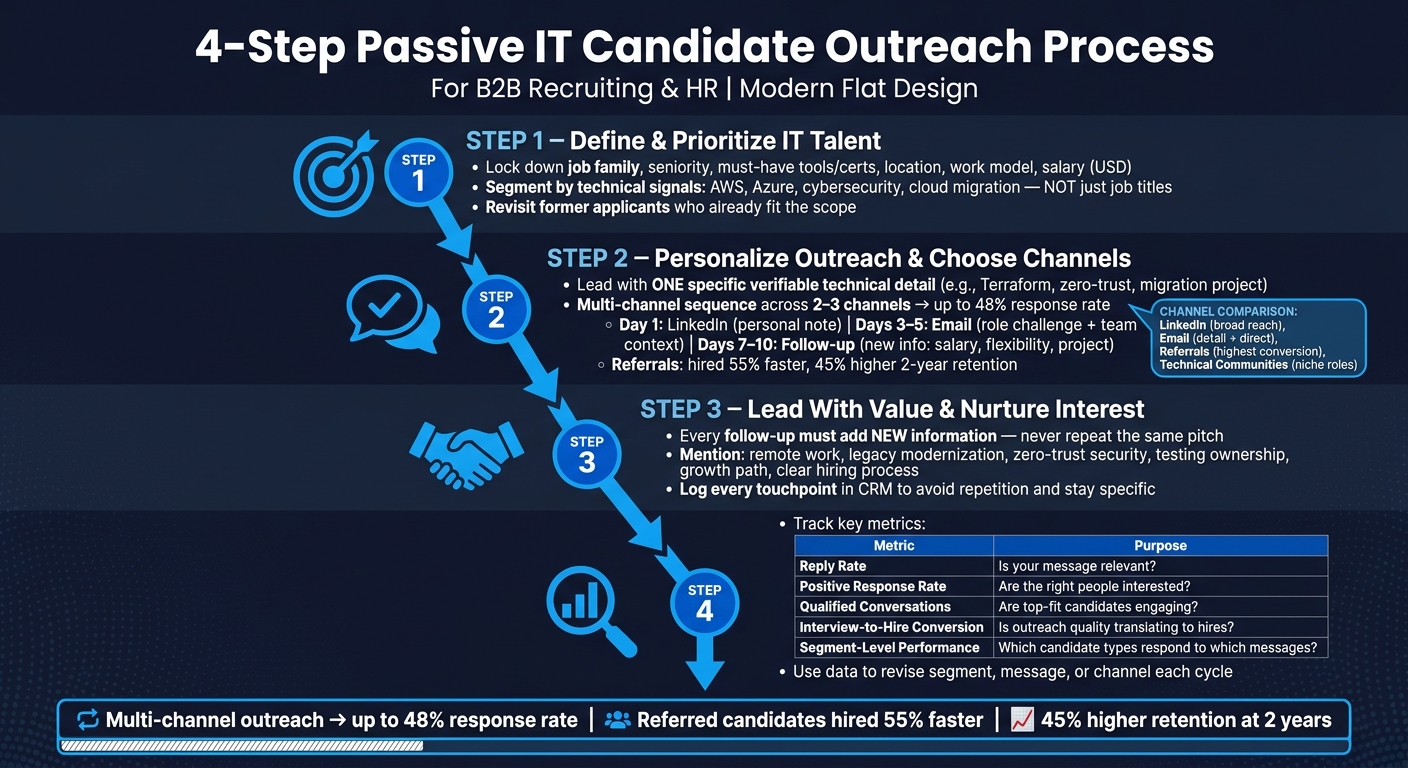
4-Step Passive IT Candidate Outreach Process
Stop Posting & Praying: Passive Candidate Sourcing That Works
sbb-itb-05efa2a
Step 1: Define and Prioritize the Right IT Talent
Start with a tight candidate profile before you begin outreach.
Confirm Role Scope Before Outreach Begins
Lock down the basics first: job family, seniority, must-have tools or certifications, location, work model, and salary range in U.S. dollars.
Use Technical Signals to Segment Candidates
After the role is set, sort your candidate pool by technical signals, not just job titles. Titles can be fuzzy. Skills and past work tell you a lot more.
Group candidates based on things like:
- Skill match for the role
- Cloud platforms such as AWS or Azure
- Cybersecurity work, including risk assessments, zero-trust architecture, or regulatory compliance
- Experience with legacy system modernization or cloud migration
Then rank people by their current level, the scope of their recent work, and proof that they’ve handled similar projects before.
It also makes sense to revisit former applicants who already fit the current scope. Start with the strongest past applicants, then confirm their contact details before reaching out.
Once the target profile is clear, tailor the message and choose the right channel mix.
Step 2: Personalize Outreach and Choose the Right Channels
Write First Messages Around Specific Candidate Details
Once you’ve set the target profile, the first message should feel personal and easy to answer. The same technical signals you used to rank candidates should shape your outreach too.
Generic messages lose passive IT candidates fast. Lines like “your profile stood out” or “exciting opportunity” sound like copy-paste outreach. Instead, lead with one recent, verifiable technical detail and connect it to the role. For example: I noticed your Terraform-based infrastructure automation work. We’re building out a platform engineering team tackling similar challenges – happy to send a short summary if it’s worth a look. It’s short, relevant, and low-pressure.
Use one recent technical detail to show fit right away. Specifics build trust. Vague praise feels like a mass send.
Use a Multi-Channel Outreach Sequence
Start with the easiest channel to respond to, then move to higher-trust touchpoints only when needed. A multi-touch sequence across 2 to 3 channels can beat single-channel outreach. One source says response rates can reach up to 48% with multi-channel outreach.
A simple sequence looks like this:
- Day 1 – LinkedIn: Send a personal note tied to one specific technical detail.
- Days 3 to 5 – Email: Add the main challenge of the role and a bit of team context.
- Days 7 to 10 – Follow-up: If there’s no reply, share one NEW detail, like salary, flexibility, or a major project.
Each message should add something new. Don’t send the same ask three times in different places.
For hard-to-fill or senior roles, put referrals near the top of the plan. Referred candidates are hired 55% faster and show 45% higher retention at two years compared to non-referrals. A warm intro from a trusted peer cuts through the noise in a way cold outreach often can’t, especially for senior technical roles.
Outreach Channel Comparison by Purpose and Fit
Use the table below to match each channel to its job in the sequence.
| Channel | Best Use Case | Strengths | Limitations |
|---|---|---|---|
| Initial personalized outreach | Broad reach; candidate context is visible; mutual connections add trust | Heavy recruiter noise; InMails are often ignored without strong personalization | |
| Follow-up with fuller context | More room for detail; professional tone; direct access when the address is verified | Low response rates with bad data; risk of spam filters | |
| Referrals | High-trust or senior roles | Highest conversion; warm intros cut friction a lot | Depends on network size; harder to scale fast |
| Technical Communities | Niche or hard-to-fill roles | Strong technical signal; GitHub and Stack Overflow show real skill depth | Direct pitching can feel intrusive; recruiters need enough technical fluency |
Treat technical communities as places to build relationships, not places to drop cold pitches. A pitch in Slack out of nowhere feels intrusive. A follow-up after prior interaction feels earned.
Step 3: Lead With Value and Nurture Interest Over Time
Offer Clear Value at Every Touchpoint
After the first outreach, move from a simple intro to proof that the role fits.
Passive candidates don’t reply just because someone keeps following up. They reply when the message feels relevant. Each note should answer one plain question: Why should this matter right now?
Get specific about the work model and the technical setup. Mention details like remote work, legacy modernization, zero-trust security, or testing ownership. That kind of context shows you understand the actual work, not just the title on the req.
Growth matters too. So does a clear hiring process. When candidates can see how the role helps them grow – and when the next steps are easy to follow – the whole experience feels more like a conversation and less like a transaction.
Build a Follow-Up Plan That Adds New Information Each Time
Use the same bar for every follow-up: add something new.
If the first message focused on the technical challenge, the next one can add team context or explain the role’s business impact. A later touchpoint can tie the work to skills the candidate has already shown in past projects or roles.
Keep a record of each touchpoint in your CRM. That way, future follow-ups can refer to what the candidate has already seen instead of repeating the same pitch. It also helps you keep each message specific, which is half the battle.
Use that same candidate history to sharpen the metrics in Step 4.
Step 4: Track Results and Refine the Process
Measure the Recruiting Signals That Matter
Start with the touchpoints already stored in your CRM. They can show you which messages push candidates forward and where passive candidates lose interest. That gives you a plain view of what’s working and what needs fixing.
Track these four metrics: reply rate, positive response rate, number of qualified conversations, and interview-to-hire conversion rate. Together, they tell you three things: whether your message gets attention, whether the right people are interested, and whether those conversations lead to hires.
It also helps to track segment-level message performance. Not every IT audience reacts to the same angle. A message that works for DevOps talent may fall flat with data engineers or security candidates. Pull outreach data into your CRM so you can track replies, segment performance, and conversion by source.
| Metric | What It Tells You |
|---|---|
| Reply rate | Whether your first message is relevant enough to get a response |
| Positive response rate | Whether candidates are actually interested, not just politely declining |
| Number of qualified conversations | Whether the right-fit candidates are engaging |
| Interview-to-hire conversion rate | Whether outreach quality is translating into real hires |
| Segment-level message performance | Which candidate types respond best to which message types |
Use these numbers to decide what needs revision: the segment, the message, or the channel. If reply rates look fine but qualified conversations are low, the issue may be targeting. If people respond but few move to interviews, the message may spark interest without setting up a good fit. Automated data validation also cuts time spent on stale leads and helps keep candidate records current.
Conclusion: A Core Checklist for Better Passive IT Recruiting
Once the data comes in, use it to tighten the next outreach cycle. Passive IT recruiting works best when each step has a clear purpose: define the role, segment by technical signals, personalize outreach, use the right channels, lead with value, and refine based on results. Tracking closes the loop and makes each cycle cleaner and sharper than the one before.
FAQs
How do I identify the right passive IT candidates?
Use AI-assisted screening and skills-based evaluation to match candidates based on technical experience while cutting bias during early review.
Then go where strong candidates already show what they can do: GitHub, Stack Overflow, and tech communities tied to the role. Look at projects and portfolios for proof of skill, set clear criteria for what the job needs, and send personalized outreach that mentions their work. That way, the candidates who fit best are more likely to reply.
What should I include in a passive candidate outreach message?
Skip the generic template and make the message feel like it was written for that person. Call out something specific the candidate has done, like a recent open-source contribution or deep experience in a technical area. That shows you’ve paid attention and that your interest isn’t just copy-and-paste.
It also helps to lead with a value-driven opportunity instead of jumping straight into a job pitch. Use research from places like GitHub or tech forums to show that you understand what they’ve worked on and what they’ve achieved in their field.
Which recruiting metrics matter most for passive IT hiring?
Focus on time-to-fill and project completion rates. These two metrics give you a clear read on passive IT recruiting, help you catch problems early, and cut the risk of operational disruptions.
Your ATS can also surface useful patterns. For example, you may find that employee referrals bring in better results than job boards, or that one sourcing channel slows things down. That makes it easier to spot bottlenecks and fine-tune your sourcing strategy.
Equifier supports this with specialized IT recruiting and staffing solutions.