









If you want hybrid cloud to work, keep the plan simple: map your apps, lock down network and identity first, deploy with code, and track uptime, risk, and spend from day one.
I’d sum up the article like this: hybrid cloud is not just a network link between your data center and AWS, Azure, or Google Cloud. It’s one shared way to handle access, security, data flow, monitoring, disaster recovery, and cost across both on-prem and cloud. The article lays out a 4-step path that moves from planning to rollout to day-to-day control.
Right up front, here’s what matters most:
- 73% of organizations use hybrid cloud
- Teams often start with interoperability first, then add deeper integration where it helps security or day-to-day work
- Site-to-site VPNs fit early pilots, while Direct Connect / ExpressRoute / Interconnect fit heavy production traffic
- A good rollout starts with low-risk dev/test workloads
- Clear cutover targets matter, such as p95 latency under 250 ms, error rates under 1%, and no Sev-1 incidents for 24 to 72 hours
- Cost control is a big issue: 84% of organizations say cloud spend is their top cloud problem, and 87% track cost efficiency as a main KPI
- DR drills should happen early, with at least one full-scale test in the first 90 days after go-live
Here’s the article in plain English:
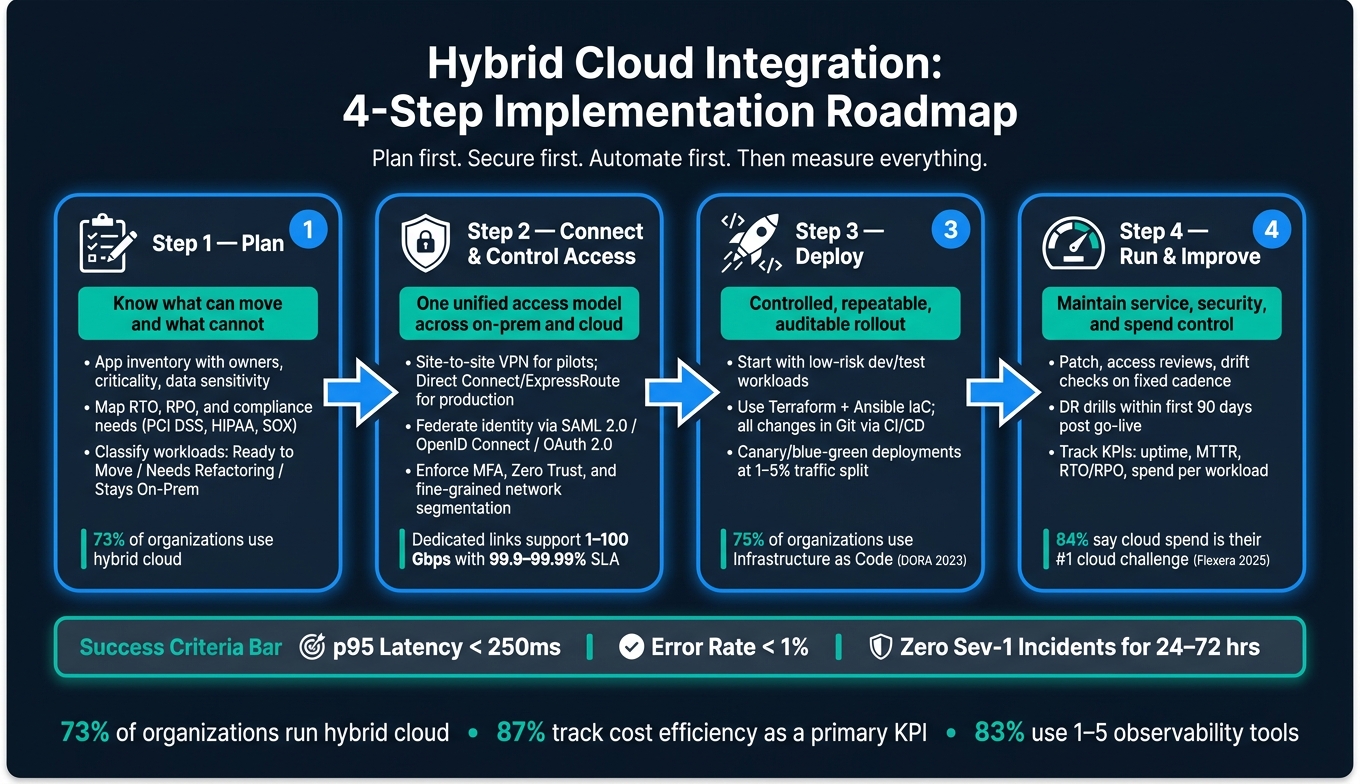
- Step 1: Inventory apps, data, owners, dependencies, RTO, RPO, and compliance needs
- Step 2: Set up secure connectivity, federated identity, MFA, segmentation, and Zero Trust rules
- Step 3: Roll out in phases with IaC, CI/CD, logs, metrics, traces, alerts, and rollback steps
- Step 4: Run patching, access reviews, drift checks, DR drills, and cost tracking on a fixed schedule
A fast way to think about it: plan first, secure first, automate first, then measure everything.
| Step | Main Goal | What You need in place |
|---|---|---|
| 1. Plan | Know what can move and what cannot | App inventory, owners, risks, RTO/RPO, compliance map |
| 2. Connect and control access | Make on-prem and cloud work under one access model | VPN or private link, IdP, SSO, MFA, segmentation |
| 3. Deploy | Move workloads in a controlled way | IaC, CI/CD, runbooks, rollback rules, observability |
| 4. Run and improve | Keep service, security, and spend under control | Patch process, DR tests, KPI reviews, budget alerts |
If I were reading this to make decisions fast, my takeaway would be simple: do not move production workloads until network, identity, logging, and rollback are already tested. That’s the thread running through the whole piece.
Hybrid Cloud Integration: 4-Step Implementation Roadmap
Complete Guide to Hybrid Integration Platform
sbb-itb-05efa2a
Step 1: Plan Your Hybrid Cloud Strategy, Architecture, and Team
Now that the core pieces are clear, the first job is to map your workloads, data, and owners. This step sets the scope, clarifies ownership, and helps you decide what moves first.
Inventory Applications, Data, Dependencies, and Risks
Start with a planning session that brings product owners and IT leaders into the same room. Have them list the services that support core operations. From there, build an application catalog that includes the owner, hosted location, criticality, data sensitivity, peak usage windows, data size, and growth rate.
Then go a level deeper. Map service calls, SaaS dependencies, DNS, IP ranges, ports, and firewall rules. Flag legacy systems, single points of failure, and overlapping IP ranges. After that, classify each workload as ready to move, needs refactoring, or stays on-prem. That classification is the main output of the inventory.
You should also document each workload’s RPO, RTO, and regulatory driver, such as PCI DSS, HIPAA, SOX, or applicable state privacy laws.
This inventory becomes the working map for migration order: what moves first, what stays put, and what needs refactoring before anything happens.
Choose the Right Operating Model and Internal Roles
A centralized model works well when you want shared standards and governance across the business. A federated model makes more sense when business units need more room to move, but still under central guardrails.
Before deployment starts, the right roles help keep architecture, security, and delivery in sync:
| Role | Key Responsibilities |
|---|---|
| Cloud Architect | Owns the hybrid strategy, reference architectures, cloud service selection, and landing zone design |
| Network Engineer | Designs VPNs, direct connections, IP addressing, routing, and DNS integration |
| IAM Engineer | Implements identity federation, SSO, RBAC policies, and access lifecycle management |
| DevOps Engineer | Builds IaC modules, CI/CD pipelines, and automation for consistent deployments |
| Security Lead | Sets security baselines, conducts threat modeling, and manages compliance alignment |
Set approval rights early. Be clear about who approves new cloud accounts, who controls routing changes, who can create IAM roles, and who owns application-level budgets.
Once those roles and approvals are in place, you can move on to connectivity and access design.
When to Bring in Outside Help
Outside help makes sense when your team is stretched thin or missing hands-on experience in network design, identity federation, or compliance validation. Equifier provides IT consulting, cybersecurity assessments, and staffing for cloud, DevOps, and security roles during implementation windows.
Step 2: Design Secure Connectivity, Identity, and Access
Set up secure connectivity and shared identity controls before any production workload moves. Use the workload inventory from Step 1 to decide which applications need a VPN, a private link, or Zero Trust controls first.
Pick a Connectivity Model That Fits Your Performance and Reliability Needs
Start by assigning non-overlapping RFC1918 ranges across on-premises and each cloud. If you skip this step, routing conflicts can turn into a mess later.
Then pick the connectivity model that matches your needs. Many U.S. teams start with a site-to-site VPN because they can get it running in hours and the upfront cost is low. As production demand grows, they often add a dedicated private link when workloads need steadier latency or total throughput above about 1 Gbps.
For critical workloads, use dedicated private connectivity as the main path and an IPsec VPN as the backup path, with BGP handling failover.
| Criteria | Site-to-Site VPN | Dedicated Private Link (Direct Connect / ExpressRoute / Interconnect) |
|---|---|---|
| Latency | Variable; internet-dependent and can spike under congestion | Consistent, low latency via a dedicated path |
| Throughput | Up to about 1–1.25 Gbps per tunnel | 1–100 Gbps per circuit; designed for high throughput |
| Reliability | Best effort; no end-to-end SLA | Telco-grade; typically 99.9%–99.99% connectivity SLA |
| Encryption | IPsec by default over the public internet | MACsec or over-the-top IPsec/TLS; treat the path as untrusted |
| Setup time | Minutes to hours | Weeks to months for ordering, cross-connects, and turn-up |
| USD cost drivers | Hourly gateway fee plus standard egress per GB | Monthly port fee, reduced egress per GB, and carrier cross-connect charges |
| Best for | Dev/test, pilot migrations, and backup connectivity | Production data center extension, high-volume replication, and mission-critical apps |
No matter which model you choose, require TLS 1.2+ or IPsec for all data in transit, including traffic on private links. Also set a key management plan up front with a central KMS or HSM and a clear rotation schedule.
Once the network path is in place, federate identity so users and workloads sign in the same way everywhere.
Federate Identity and Standardize Access Policies
After the network design is done, identity becomes the next control plane to lock down. The goal is simple: one identity provider, usually corporate Active Directory synced to Azure Entra ID, that all cloud platforms and SaaS apps trust.
Use SAML 2.0 or OpenID Connect for SSO to cloud consoles and web applications. For APIs and service-to-service calls, use OAuth 2.0 with short-lived JWT access tokens. Enforce MFA at the IdP level for all users, then add conditional access policies that check device compliance, sign-in location, and user risk before access is granted.
For applications and automation, stop relying on shared secrets. Use managed identities or service principals, and scope them to only the permissions each workload needs. Tie provisioning and de-provisioning to HR or vendor onboarding and offboarding so access changes happen automatically when roles change.
With identity centralized, the next step is to limit access so each workload can reach only what it needs.
Apply Zero Trust and Network Segmentation
Traditional perimeter security draws a hard boundary at the edge and trusts what is inside. In hybrid cloud, that falls apart fast because workloads live across on-premises and cloud environments. Zero Trust swaps that model for a simpler rule: verify every request, every time, no matter where it comes from.
| Dimension | Traditional Perimeter | Zero Trust in Hybrid Cloud |
|---|---|---|
| Trust model | Inside is trusted; outside is untrusted | Never trust, always verify regardless of network location |
| Segmentation | Coarse; VLANs or subnets with broad lateral movement once inside | Fine-grained small segments per application or resource |
| Access control basis | Source IP, network zone, static firewall rules | Strong identity, device posture, and contextual signals per request |
| Visibility | Edge-focused logging | Centralized logs from identity, network, and workload layers |
In practice, split the environment into small segments based on application tier, data sensitivity, or business function. Use tag-based firewall rules like app=payments and env=prod instead of IP-based rules, so policies keep working even when workloads move around.
Add a ZTNA layer so services stay hidden until the user or workload is both authenticated and authorized. Start with the most sensitive applications first, then expand from there.
Send firewall, IdP, and cloud flow logs to a central SIEM, and alert on policy violations and unusual access patterns.
Step 3: Deploy the Integration Using IaC, DevOps, and Observability
With secure connectivity and identity controls in place, the next job is simple in theory and messy in practice: deploy in a way you can repeat, audit, and roll back fast if something goes wrong. That’s where the workload inventory and risk ranking from Step 1 matter. They tell you what should move first instead of leaving the order up to guesswork.
Roll Out in Phases, Starting with Low-Risk Workloads
Follow the sequence confirmed in Step 2: connectivity, identity, security baselines, and then workloads. Start with dev/test systems that are already marked as ready to move. After that, expand to higher-risk systems. This gives you room to test routing between environments, identity flows, and monitoring before business-critical traffic starts moving.
Before each phase, write the deployment runbook. Do it before cutover, not during the scramble. Set success criteria up front:
- p95 latency under 250 ms
- Error rates under 1%
- No Sev-1 incidents during a 24- to 72-hour window
Set rollback triggers too. If error rates spike, latency doubles, or a critical alert fires, the team should already know what happens next. Prewrite the rollback steps: return to the last known-good Git commit, switch DNS or load balancer routing back, and restore snapshots if needed.
Once dev/test workloads are steady and you’ve checked the pipelines, monitoring, and incident response flow, move to medium-critical apps with canary or blue/green deployments. Send a small share of traffic – usually 1% to 5% – to the new hybrid environment, watch the numbers closely, and expand only if those numbers stay in range. Keep the legacy stack running side by side until the new environment meets every success target. After the pilot is stable, turn that path into the standard using IaC and CI/CD.
Use Infrastructure as Code and CI/CD for Consistency
IaC helps keep on-premises and cloud changes in sync through one controlled process. That way, both sides of the hybrid setup change together instead of drifting apart over time.
Use Terraform for cross-cloud provisioning, cloud-native templates when platform-specific features matter, and Ansible for OS and app configuration. Put every change in Git, require pull requests, and ban manual edits in production. If someone changes production by hand, you’ve basically planted a future outage and called it a shortcut.
Build reusable modules for common parts like VPCs, subnets, IAM roles, Kubernetes clusters, and logging pipelines. Parameterize them so the same templates work across dev, test, and production, with only the variables changing.
A typical CI/CD pipeline should run terraform validate → plan → security scan → convert the plan to JSON for policy checks → manual approval for production-sensitive changes → apply. Use OPA or Sentinel to check the Terraform plan JSON and block changes that break encryption, tagging, or cost rules. The 2023 DORA State of DevOps report found that 75% of organizations use infrastructure as code.
Centralize Logs, Metrics, Traces, and Alerts
Build observability into every phase from the start. Don’t tack it on later. In a hybrid setup, observability is the control layer. Without one shared view across on-premises and cloud, problems at the boundary can be hard to spot and slow to fix.
| Phase | Primary Tools | Key Outputs | Owner |
|---|---|---|---|
| Connectivity & IAM | Amazon CloudWatch, Azure Monitor, network and auth logs | Link utilization, authentication success rates, latency baselines | Network & IAM engineers |
| Security baselines | SIEM tools such as Splunk or Elastic, cloud security posture tools | Policy violations, misconfiguration alerts, firewall logs | Security team |
| Dev/test workloads | Prometheus + Grafana, Elastic Stack, OpenTelemetry | Error rates, resource utilization, distributed traces | Platform/SRE team |
| Medium-critical apps | Alertmanager, Grafana Loki, AWS X-Ray, or Azure Monitor | Canary traffic metrics, latency percentiles, trace anomalies | SRE + app owners |
| Business-critical apps | Full observability stack with PagerDuty or Opsgenie | SLA compliance, incident response time, cost per workload | SRE + engineering leads |
Use one shared stack for metrics, logs, traces, and alerting. Route alerts to PagerDuty or Opsgenie, and tie them to runbooks and severity levels so responders aren’t left figuring things out on the fly. The Observability Pulse 2024 survey found that 83% of organizations use between 1 and 5 observability tools.
Step 4: Operate, Secure, and Improve the Hybrid Environment
Once workloads are live, the job changes. The focus moves to steady operations, tight security, and cost control. Go-live isn’t the finish line. It’s where day-to-day discipline starts.
Run Day-to-Day Operations with Clear Runbooks
Every repeat task needs a written runbook, a named owner, and a set cadence. That includes patching, access recertification, backup checks, and failover drills.
Patch runbooks should spell out the change approval window, rollback steps, and post-patch checks. That can include API health checks and synthetic user tests across on-premises servers and cloud services. Access review runbooks should run monthly or quarterly and cover IAM roles, federated identities, and SSO group memberships to support HIPAA and SOX access reviews. Drift detection runbooks should explain how to compare deployed resources against the intended IaC state and fix differences before they turn into bigger problems. Store runbooks in version-controlled repositories, then update them after incidents and drills.
Failover drills need extra care. Test RTO and RPO for the hybrid path on their own. Use the criticality and recovery targets defined earlier before the drill steps begin. A drill runbook should cover DNS cutover steps, data replication checkpoints, and application checks, with clear pass/fail timing criteria. Schedule at least one full-scale DR exercise within the first 90 days post–go-live. That early test can expose weak spots in docs and staffing before a live incident does.
SLO-based service management ties this work together. Define availability and latency targets in terms users feel, such as "99.9% monthly availability" or "p95 API latency under 300 ms", and track them end to end across both environments. If the error budget is used up, slow deployments and put reliability work first until performance settles down. Each runbook should map to the SLO it protects.
Track Cost, Risk, and Performance Continuously
After reliability, spend needs the same level of attention. Flexera‘s 2025 State of the Cloud report found that 84% of organizations say managing cloud spend is their top cloud challenge, and 87% now use cost efficiency as a primary cloud KPI. That points to a plain operational issue: hybrid environments create costs across cloud billing, dedicated link charges, and on-premises infrastructure, and those costs can drift out of sight without clear governance.
Track all costs in one USD view. Pull in AWS Cost and Usage Reports or Azure Cost Management exports into an analytics tool, tag each resource by application, environment, and owner, and set budget alerts before the invoice shows a surprise. Track bandwidth and egress on their own. Match data transfer metrics per link – Direct Connect, ExpressRoute, and VPN – with billing line items so inefficient data flows stand out early.
For performance and risk, keep a short set of business-aligned KPIs:
| KPI | What It Measures | Why It Matters |
|---|---|---|
| Uptime / availability | Service health and SLO compliance | Shows whether the environment is meeting business targets |
| MTTR | Speed of incident resolution | Indicates operational maturity and runbook quality |
| RTO / RPO achieved in drills | Actual vs. target recovery performance | Validates DR readiness under realistic conditions |
| Spend per workload (USD) | Cost attribution by application and team | Supports showback, chargeback, and rightsizing decisions |
| Egress and bandwidth cost (USD) | Data transfer spend per link | Identifies noisy neighbors and inefficient integrations |
| Critical security findings | Open vulnerabilities and misconfigurations | Tracks risk exposure and remediation progress |
Review these metrics on a set cadence: weekly for operational health, and quarterly for security, compliance, and DR readiness. If internal teams don’t have enough FinOps or security architecture depth, Equifier can help with cybersecurity risk assessments, compliance gap analysis, and IT infrastructure optimization.
Conclusion: A Practical Path to Hybrid Cloud Integration
With operations, security, and cost controls in place, hybrid cloud integration follows a clear lifecycle: define business goals, inventory applications and dependencies, design secure connectivity and identity controls, automate deployment through IaC and DevOps, and then operate, secure, and improve the environment over time. Each step builds on the one before it. Skip one, and it often shows up later as an incident, a compliance gap, or a cost overrun.
Success comes from disciplined operations, clear ownership, and the right expertise – not just the tech stack. For U.S. businesses, that means SLO-driven service management, structured DR testing, clear ownership at every layer, and regular risk reviews. When internal teams need backup – whether for a complex migration, a security assessment, or day-to-day hybrid operations – Equifier’s recruiting, staffing, and cybersecurity consulting services can help source the specialized IT professionals and expertise needed to keep the program moving. Hybrid cloud is an ongoing capability that should become more reliable, more efficient, and more secure with each operational cycle.
FAQs
How do I know which workloads should stay on-prem?
Keep workloads on-prem based on three things: business criticality, security and compliance needs, and technical fit.
If a system is mission-critical and needs tighter control or stricter protection, it usually makes sense to keep it on-prem. Less sensitive apps, on the other hand, are often better candidates for the cloud.
It also helps to look closely at dependencies and cloud fit. Some workloads are tightly connected to other systems, and moving one without the rest can create headaches. Others may run into performance or latency problems in a cloud setup. In those cases, keeping them on-prem – or updating them step by step – tends to be the safer path.
Legacy workloads deserve extra scrutiny too. If they’re outdated, brittle, or hard to connect with modern systems, they often belong on-prem for now.
When should I use a VPN versus a private link?
Use a private link for production workloads that need high speed, reliability, and steady performance. It offers more stable throughput and lower latency than the public internet.
Use a VPN for general connectivity needs. VPNs can come with less predictable latency and jitter, and standard tunnels are usually capped at 1.25 Gbps, while dedicated cloud interconnects can scale up to 100 Gbps.
What should I test before moving production workloads?
Before you move production workloads, map how the whole system works from end to end. That means checking app, API, and database interactions so you can see where one part depends on another. If you skip this step, small issues can snowball fast once traffic hits production.
Run automated tests in a staging environment that mirrors production as closely as possible. Include contract tests and characterization tests, not just basic happy-path checks. The goal is simple: make sure the system behaves the way you expect before the move, not after.
It also helps to test rollout patterns in advance. Validate that your rollout approach is safe, confirm that your rollback plan actually works, verify security controls, and run full restore and recovery drills. Backups only matter if recovery works when you need it.