








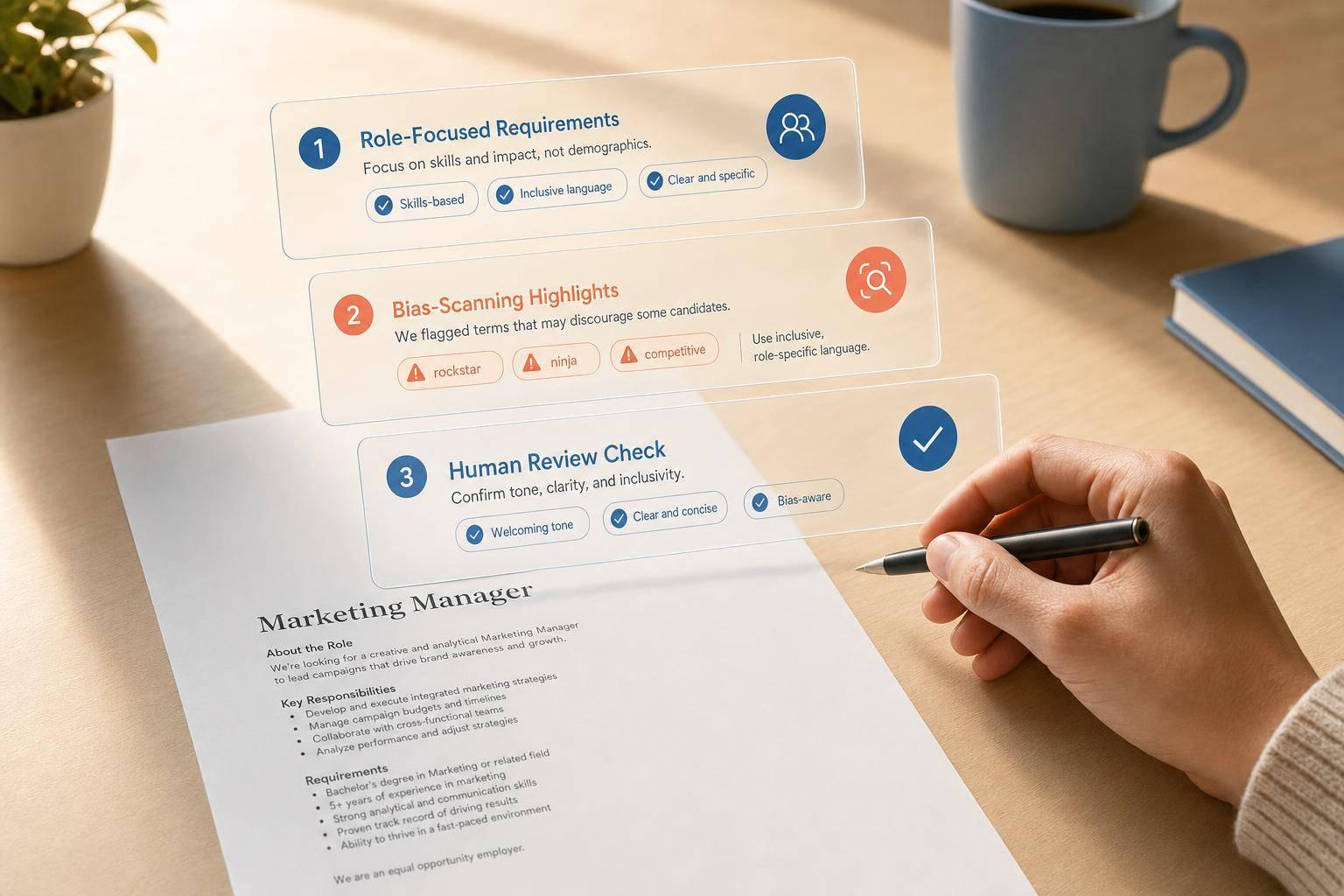

A bias-free job ad usually comes down to a simple 3-step process: write the role clearly, scan the language, then review it with people before you post. If I want more qualified applicants, I need to cut gender-coded words, age-coded phrases, ableist terms, vague “culture fit” language, and long requirement lists that block good candidates.
Here’s the short version:
- I start with the actual job requirements, not personality labels
- I separate must-haves from nice-to-haves
- I use a language tool to flag risky wording
- I replace flagged terms with plain, skill-based language
- I add a human check for HR, the hiring manager, and legal or DEI review
- I track results like application volume, time-to-hire, and screen-pass rate
A few details matter right away. In the U.S., wording in job ads can create risk under Title VII of the Civil Rights Act of 1964. And in technical hiring, inflated requirements and insider jargon can cut down the applicant pool fast. Adding a pay range like $90,000–$110,000 and using clear U.S. English can help set expectations early.
If I hire for repeat roles like cloud, cybersecurity, or SQL jobs, I can turn cleaned-up ads into reusable templates so the process stays consistent from one post to the next.
This article walks through that repeatable workflow in a clear, step-by-step way.
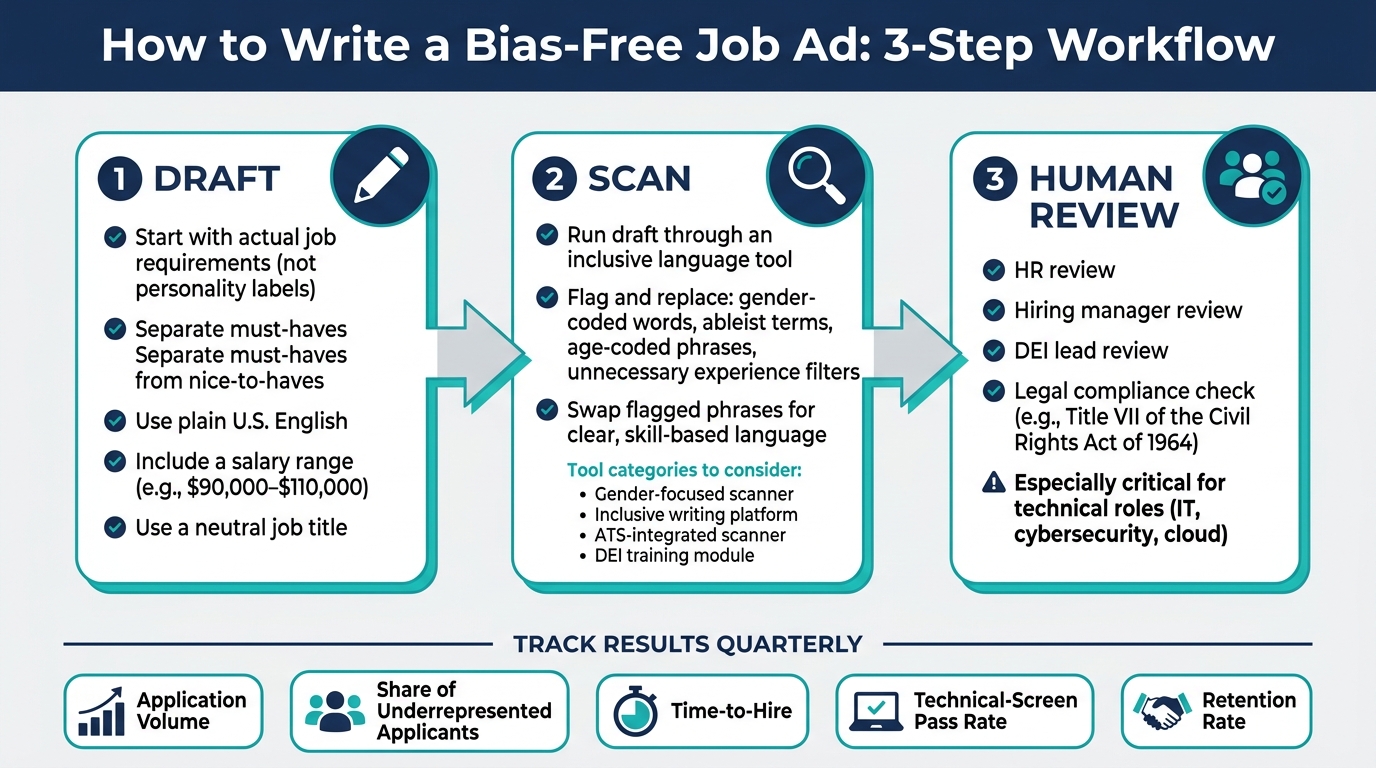
Bias-Free Job Ad Workflow: 3-Step Process for Inclusive Hiring
Posting a job ad? Spell-check for gender bias! | Jenifer Clausell-Tormos | TEDxOdenseWomen
sbb-itb-05efa2a
Choose the Right Language Tools for Your Hiring Workflow
Inclusive language tools scan job ads, flag biased terms, and suggest neutral alternatives. The best ones also help teams follow the same review process across hiring groups.
The next step is simple: pick a tool that fits how your team already works.
What to Look for in an Inclusive Language Tool
Look for a tool that can spot bias linked to age, gender, ability, and cultural identity, including cases where those signals overlap. That matters because bias in job ads doesn’t always show up in one clean category. Sometimes it sneaks in through a mix of wording choices.
The tool should also match the way your team writes, reviews, and publishes job ads. If your recruiters work in U.S. English and hire under U.S. norms, the tool needs to support that from the start. Integration with your ATS or CRM helps keep reviews inside your current process instead of forcing people to copy and paste text across systems.
Usability matters too. If the interface feels clunky, people won’t want to use it. For many recruiters, a simple setup is better than a feature-heavy tool that slows them down. It also helps to have real-time scanning and suggestions that stay up to date.
Tool Categories HR Teams Commonly Use
HR teams usually compare a few common types of tools. Some focus on gender-coded wording and pronoun use. Others take a broader approach and review language tied to age, ability, and cultural identity, while also including DEI glossaries.
Here’s the basic split:
- Gender-focused tools help catch gender-coded terms and pronoun issues early.
- Broader inclusive writing tools check for a wider range of bias signals and often support glossary-based review.
- ATS-based tools keep edits inside the systems recruiters already use.
- Training tools help teams apply the same language rules across the hiring process.
Comparison Table: Features to Evaluate Before Adoption
Use these features to compare tools before adoption.
| Tool Category | What It Helps With | Typical Output | Best Use Case | Workflow Notes |
|---|---|---|---|---|
| Gender-coded language scanner | Flags gender-coded wording and pronoun issues | Flagged terms and rewrite suggestions | Early draft review | Quick way to catch obvious wording issues |
| Inclusive writing platform | Reviews language across generations, cultural and gender identities, and abilities | Broader language checks and glossary support | Final-pass review before posting | Best when you want broader coverage |
| ATS-integrated bias scanner | Runs inside your hiring workflow | Inline suggestions | Teams that review ads inside their ATS or CRM | Helps avoid copying text between systems |
| DEI training module | Supports inclusive language use across hiring teams | Aligns teams on inclusive language rules | Team training alongside tool use | Supports a common language across hiring teams |
Once you choose a tool, run it on a draft before you start editing flagged terms. After rollout, make it part of the process for every draft before posting.
How to Use Language Tools Step by Step When Writing a Job Ad
Use your tool in this order: draft, scan, human review. Start with the draft. A tool can only improve what’s already on the page.
Start with a Clear Draft Built Around Job Requirements
Before you open any language tool, write a draft based on what the role actually requires. Use a neutral job title. Split must-have qualifications from nice-to-have qualifications so you don’t screen out strong candidates just because they don’t meet every single item.
Describe the work in plain U.S. English. Skip personality-based wording that feels subjective or vague. Add a salary range, like $90,000–$110,000, right in the draft. That helps support equity and sets expectations early.
Run the Draft Through a Bias Scan and Revise Flagged Wording
Next, run the draft through your chosen tool. The scan helps, but the real work happens in the edit that comes after.
Watch for flags such as:
- gender-coded words
- ableist terms
- age-coded phrases
- unnecessary experience filters
When the tool marks a phrase, swap it for clear, skill-based language that reflects the actual work in plain U.S. English. Keep the requirement. Cut the bias.
Add a Human Review Before Posting
Tools miss things. That’s why a final human review matters. Have HR, the hiring manager, and a DEI lead check the language, accuracy, and legal fit. Make this step required for every job ad.
This is especially important in technical roles, where a few words can quietly shrink the applicant pool.
Apply This Process to IT and Cybersecurity Job Ads
That final review matters even more in technical roles, where a few words can quietly shrink the candidate pool. IT and cybersecurity job descriptions are especially prone to bias because the language often screens out qualified people before hiring even starts.
Common Bias Risks in Technical Job Descriptions
IT and cybersecurity job ads often push good candidates away through a few common patterns:
- Technical jargon that signals insider status more than actual job needs
- Inflated must-haves that cram unrelated skills into one long required list
- Experience minimums that screen out people with the right skills but a different career path
- Required credentials that don’t tie directly to the job’s day-to-day work
Keep the requirements tied to the work itself. In a cloud engineer posting, that means naming the actual platforms, deployment tasks, and security duties involved – not personality labels or broad credential stand-ins.
How Equifier Can Build Bias-Checked Templates for Repeat Hiring

If you hire for the same technical roles again and again, it makes sense to turn cleaned-up language into a reusable template. Teams hiring cloud engineers, cybersecurity analysts, or SQL developers on a regular basis can save time and keep hiring standards steady by building a library of bias-checked templates.
Equifier can support bias-checked templates for recurring roles such as deployment engineering or SQL development.
Measure Results and Keep Job Ads Bias-Free Over Time
Track Recruiting Outcomes After Tool Adoption
Once your job-ad templates are live, check whether the wording changes are doing what you hoped. If you removed biased language, the next step is simple: see whether the updated post brings in a broader and more qualified applicant pool.
After you roll out language tools, track application volume, share of underrepresented applicants, time-to-hire, technical-screen pass rate, and retention rates for the roles you’ve updated.
Before-and-after comparisons help you spot what changed. A good way to do this is to look at the same role types over time. Pick two or three recurring roles in software engineering, cloud infrastructure, or cybersecurity, then compare older postings with the revised versions. Pay close attention to whether the share of underrepresented applicants goes up and whether candidates more often meet the role’s technical requirements.
Candidate feedback matters too. It’s easy to skip, but it can tell you things a tool won’t. A short, optional survey that asks whether the job description felt clear and inclusive can point out friction points you might otherwise miss.
Use a Simple Review Table to Support Continuous Improvement
Use this quarterly review table to track the language change, the metric, and the next action.
| Metric | Baseline (Pre-Tool) | Result After Tool Use | Language Change Made | Next Action |
|---|---|---|---|---|
| Application Volume | Avg. apps per job post | Total volume change | Removed "rockstar/ninja" labels | Monitor niche board traffic |
| Share of Underrepresented Applicants | % of underrepresented applicants | % increase in diverse applicants | Removed gendered superlatives | Expand tool use to all IT roles |
| Time-to-Hire | Days from post to offer | Reduction in hiring days | Standardized job-ad language | Compare results across the same role type |
| Technical-Screen Pass Rate | % of qualified applicants | % passing technical screen | Clarified technical stack needs | Review interview scorecard |
| Retention Rate | % turnover at 1 year | New retention % | Removed culture-fit language | Review templates quarterly |
Fill this out once per quarter for each role category. If a metric stays flat, that usually means the issue may not be the job ad alone. At that point, look at interview panels, hiring manager behavior, and how job requirements are being used in practice.
The aim is to make bias-free language part of the normal hiring process, check it each quarter, and adjust when needed.
FAQs
How often should we review job ad templates?
Review job ad templates at least once a year. You should also revisit them whenever major changes happen in your organization or industry.
Each review is a chance to fold in stakeholder feedback, lessons from recent hiring cycles, and updates from relevant industry sources. That way, your ads stay inclusive and aligned with what your team needs right now.
Who should approve a bias-free job ad before posting?
A bias-free job ad should be reviewed by people, not just AI tools. Before you post it, have hiring managers, HR teams, or the right leaders read it closely.
That human review helps spot bias an automated tool might miss. It also makes sure the ad lines up with company culture and supports fairness, accountability, and transparency throughout the hiring process.
What metrics show if inclusive language is working?
Track key metrics like time-to-fill, project completion rates, employee retention, and hiring patterns over time. These numbers can show whether inclusive language and related diversity efforts are cutting bias and bringing in a more diverse candidate pool.
It also helps to use regular surveys, focus groups, and informal check-ins to hear how employees feel about inclusion at work.